ClaudeKit





ClaudeKit: The Essential Free Extension for Claude.ai Power Users
Overview
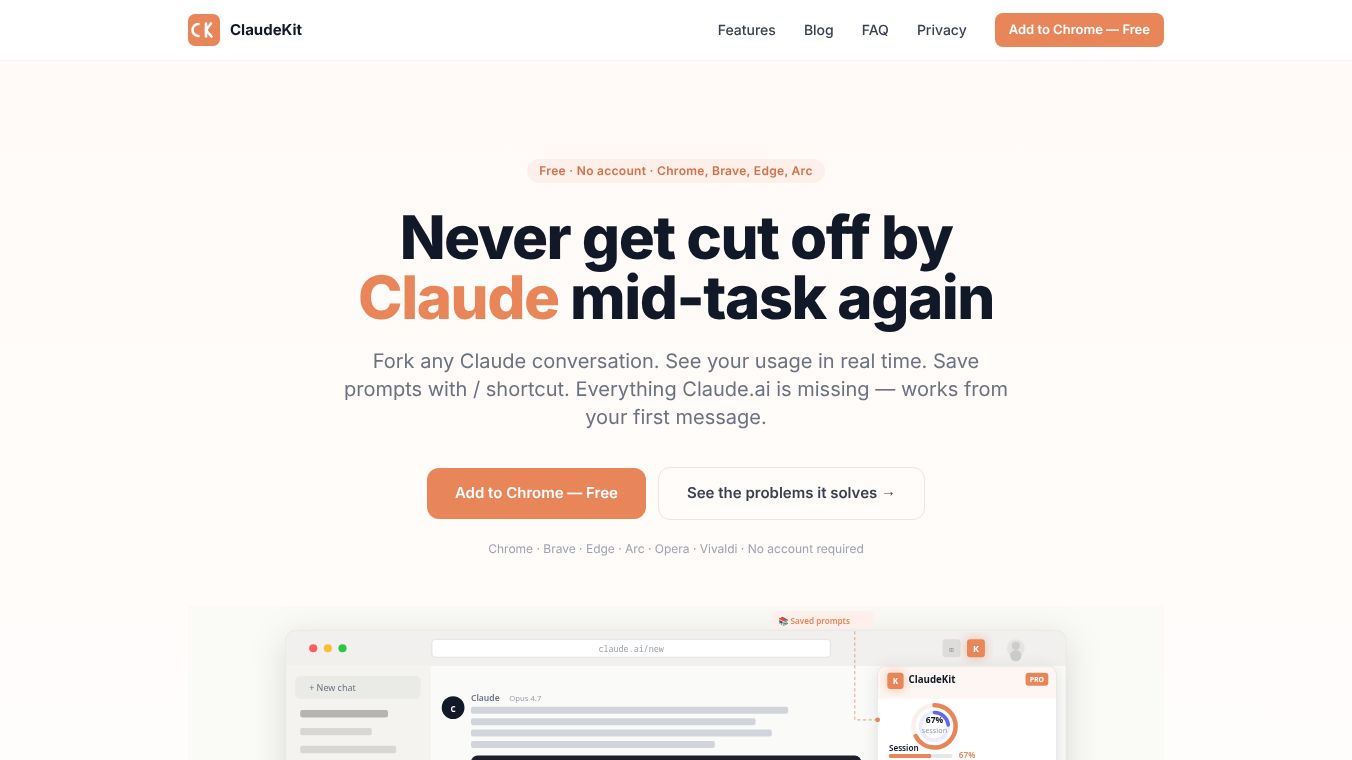
ClaudeKit is a free, privacy-first Chrome extension designed to enhance the Claude.ai experience by adding critical features that are currently missing from the platform. Built by Avish Shah, a power user from Bangalore, India, the extension addresses common frustrations such as unexpected session limits, lack of conversation branching, and the absence of a prompt library. It is trusted by over 300 users across 50+ countries and works instantly without requiring an account.
Benefits
ClaudeKit integrates seamlessly into your workflow, providing the following capabilities immediately upon installation:
1. Live Usage Tracking and Limit Alerts
One of the most significant pain points for Claude users is hitting usage limits without warning. Claude Pro applies a rolling session limit (resetting approximately every 5 hours) and a weekly limit, neither of which provides a warning before cutting off access.*Real-Time Badges:ClaudeKit displays a live badge on every Claude.ai page showing your current Session and Weekly usage percentages.*Reset Countdowns:It provides an exact countdown timer for when your limits will reset, allowing you to plan your work sessions effectively.*Prevention:Users can see their usage approaching 100% before it hits the wall, preventing interruptions mid-task.
2. Conversation Forking (Branching)
Claude.ai does not natively support branching conversations. If you want to explore a different angle or approach, you typically have to start a new chat, losing all previous context.*Fork Any Message:ClaudeKit adds a "Fork" button to every message. Clicking this opens a new tab with the full conversation context up to that point.*Preserve Original Thread:Your original conversation remains untouched, allowing you to experiment with different ideas without losing your primary thread. This is often described as "Git branching for AI conversations."
3. Local Prompt Library
There is no built-in prompt management system in Claude.ai, forcing users to manually copy and paste prompts from notes apps.*Save and Tag:Users can save their best prompts locally and tag them by category.*Instant Insertion:By typing a forward slash (/) in the chat input, any saved prompt can be inserted instantly.*Privacy:All prompts are stored locally on the user's device; nothing is sent to any server.
4. Live Token and Word Counter
Managing context windows and session usage requires precise knowledge of token consumption.*Input Counting:As you type in the Claude.ai input field, ClaudeKit displays live word and token counts.*Response Counting:It also displays token counts on every Claude response, helping users understand exactly how much of their allowance each exchange consumes.
5. Right-Click "Ask Claude"
- Universal Context:Users can right-click on any text anywhere in their browser and select "Ask Claude" to query information from any website directly within the Claude interface.
6. Conversation Export
- Data Ownership:Users can download any conversation they wish to keep as Markdown, JSON, or plain text, ensuring their work remains theirs.
Use Cases
ClaudeKit is designed for anyone who uses Claude.ai regularly and wants more control over their interactions. It is particularly useful for:
- Freelancers and Writers:Those who need to manage their token usage carefully to avoid unexpected interruptions during long writing sessions.
- Researchers and Analysts:Professionals who need to branch off from a main conversation to explore different angles or hypotheses without losing the original context.
- Developers and Tech Enthusiasts:Users who appreciate the "Git branching" analogy for conversation management and need precise token counting for complex coding tasks.
- Students and Learners:Individuals who want to build a personal library of effective prompts to speed up their learning process.
- Privacy-Conscious Users:Anyone who prefers tools that do not collect data, track usage, or require an account setup.
Pricing
ClaudeKit is completely free to use. There are no freemium tiers, hidden costs, or upsells. The tool remains free for all users regardless of their Claude.ai plan (Free, Pro, or Max).
Vibes
ClaudeKit has gained trust among a growing community of users. It is trusted by over 300 users across 50+ countries. The extension is often praised for solving the "flying blind" problem associated with using Claude.ai. Users appreciate that it transforms the user experience without compromising privacy. The community response highlights its value as a must-have tool for power users who want to maximize their efficiency on the platform.
Additional Information
ClaudeKit is built by Avish Shah, a power user from Bangalore, India. The extension works on all Chromium-based browsers, including Chrome, Brave, Microsoft Edge, Arc, Opera, and Vivaldi. Firefox support is noted as coming soon. The tool auto-detects and works with Claude Free, Pro, and Max plans. While limit reset times differ by plan, the live tracking functionality works identically across all tiers. Installation takes approximately 30 seconds and requires no configuration. The extension requests exactly four permissions: storage, notifications, contextMenus, and claude.ai. All settings, prompt libraries, and usage history (30-day) are stored locally using Chrome's storage API. The developers do not collect analytics, telemetry, or user data. There are no cookies, tracking pixels, or third-party services involved. The extension makes network requests only to claude.ai to read the same usage data that Claude already exposes in its Settings page.
This content is either user submitted or generated using AI technology (including, but not limited to, Google Gemini API, Llama, Grok, and Mistral), based on automated research and analysis of public data sources from search engines like DuckDuckGo, Google Search, and SearXNG, and directly from the tool's own website and with minimal to no human editing/review. THEJO AI is not affiliated with or endorsed by the AI tools or services mentioned. This is provided for informational and reference purposes only, is not an endorsement or official advice, and may contain inaccuracies or biases. Please verify details with original sources.

Comments
Please log in to post a comment.