Unmark





Unmark: A Comprehensive Review of AI Watermark Removal
Overview
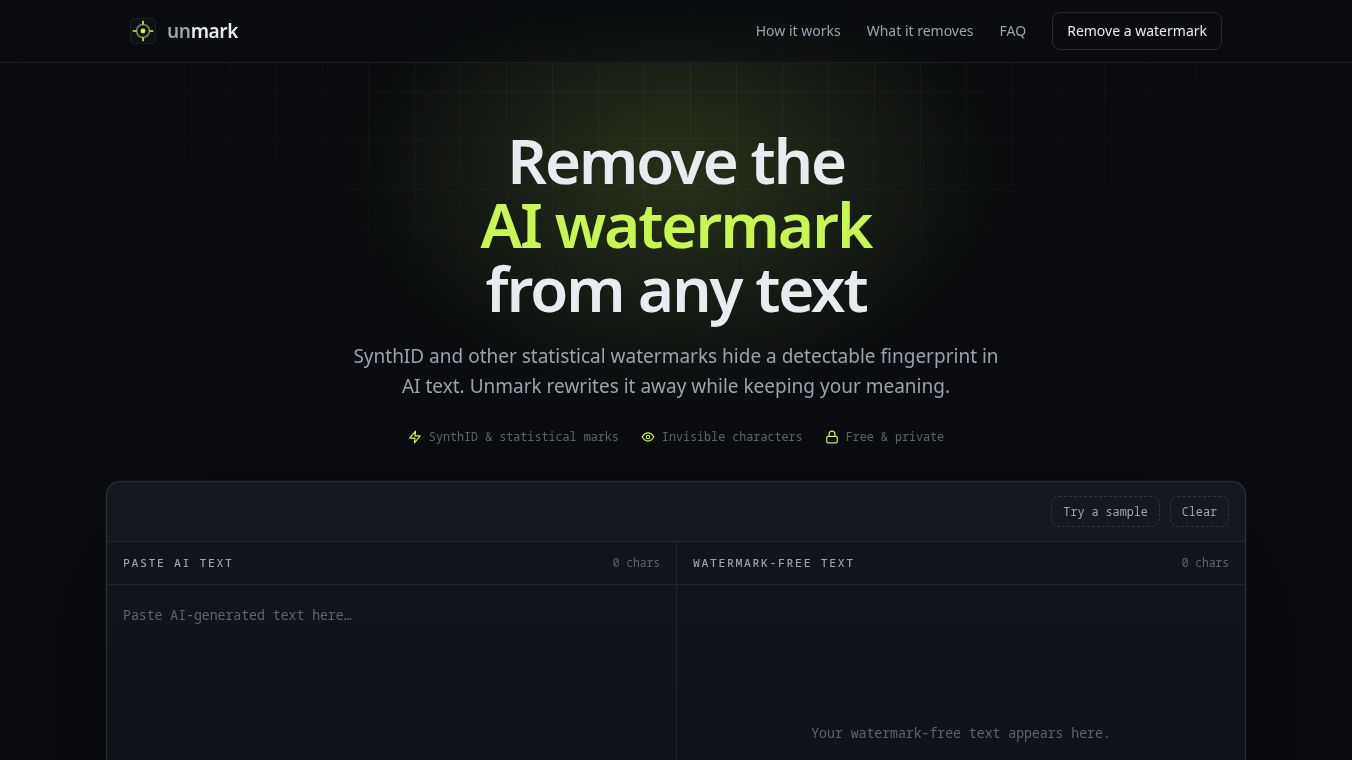
Unmark is a specialized text processing tool designed to remove statistical and hidden-character watermarks from AI-generated text. Developed to address the growing need for content indistinguishability, Unmark ensures that the meaning and readability of the original text remain intact while eliminating AI fingerprints. The tool operates directly within the user's web browser, prioritizing privacy by not retaining user data and never training models on submitted content.
Key Features
Unmark leverages proprietary deep learning models to detect and strip various types of AI markers. Its core capabilities include:
- Statistical Watermark Removal:Eliminates statistical patterns embedded by AI models to identify generated text.
- Hidden Character Stripping:Removes invisible characters and hidden metadata often left by AI writing assistants.
- Browser-Based Operation:Functions entirely within the browser, requiring no software installation and ensuring data stays local.
- Privacy First:Adheres to a strict zero-data-retention policy; user content is not stored or used for training.
- Instant Processing:Provides immediate results for text cleaning.
- API Integration:Offers an API for developers to integrate watermark removal into their own applications.
- Multimodality:While primarily text-focused, the underlying technology supports vision and video capabilities.
How to Use Unmark
Using Unmark is a straightforward, client-side process:1. Navigate to the Unmark website.2. Paste the AI-generated text into the provided input field.3. Initiate the watermark removal process.4. Review the processed text, which will have statistical and hidden-character watermarks removed.5. Copy the cleaned text for further use.
Target Audience and Use Cases
Unmark is designed for individuals and organizations requiring AI-generated text to appear human-written. Key user groups include:*Content Creators:Individuals preparing AI-assisted content for publication who need to ensure it passes as human-written.*Researchers and Academics:Users analyzing AI text who need to remove watermarks for specific experimental conditions or data anonymization.*Privacy-Conscious Users:Anyone seeking to eliminate AI fingerprints to prevent traceability of their generated content.*Developers:Those looking to integrate watermark removal functionality into their applications via the Unmark API.
Pricing and Plans
Unmark operates on a freemium model, offering accessible entry points for both casual and programmatic users:*Free Tier:Provides instant scanning and core watermark removal features directly in the browser without requiring an account or credit card.*API Usage:For programmatic access, Unmark uses a credit-based system:* Standard removal: 1 credit per image/text unit.* Full removal: 8 credits per image/text unit.* Note: A 402 error indicates insufficient credits.
Pros and Cons
Pros:* Effectively removes both statistical and hidden-character AI watermarks.* Operates entirely in the browser, ensuring no data leaves the user's device.* Maintains the original meaning and readability of the text.* Offers a free tier for basic usage.* Provides an API for custom integrations.
Cons:* Does not explicitly display character-by-character changes during the removal process (unlike some competitors that offer transparency into specific modifications).* Specific technical details regarding the proprietary deep learning models are not publicly disclosed.* API usage incurs costs for high-volume users.* Limited public information regarding user reviews and reception specifically for the watermark removal tool.
Comparison with Competitors
Unmark distinguishes itself in a niche market through its browser-based architecture and explicit privacy commitments. While other tools offer similar functionalities, Unmark focuses on direct removal without necessarily highlighting individual watermarks during the process.
- Vs. TextWash:TextWash offers a Chrome extension and explicitly shows character-by-character changes, providing more transparency into the cleaning process.
- Vs. GPT CLEAN UP:This tool specifically targets invisible Unicode characters and HTML attributes left by AI assistants, requiring no sign-up, similar to Unmark's free tier.
- Vs. Neat Text:Neat Text scans for over 34 common invisible characters and highlights them for review before removal, offering more insight into what is being cleaned compared to Unmark's direct removal approach. It also detects over 3,000 AI phrases.
- Vs. General Metadata Removers:Other tools focus on stripping hidden metadata and statistical watermarks to make content look natural, but Unmark's implementation of deep learning for this purpose is a key differentiator.
Conclusion
Unmark serves as a robust solution for those needing to sanitize AI-generated text of statistical and hidden markers. By operating locally in the browser and utilizing advanced deep learning models, it balances effectiveness with strong privacy standards. While it lacks the granular transparency of some competitors regarding character-level changes, its ease of use, free access, and API capabilities make it a valuable tool for content creators, researchers, and developers alike.
This content is either user submitted or generated using AI technology (including, but not limited to, Google Gemini API, Llama, Grok, and Mistral), based on automated research and analysis of public data sources from search engines like DuckDuckGo, Google Search, and SearXNG, and directly from the tool's own website and with minimal to no human editing/review. THEJO AI is not affiliated with or endorsed by the AI tools or services mentioned. This is provided for informational and reference purposes only, is not an endorsement or official advice, and may contain inaccuracies or biases. Please verify details with original sources.




Comments
Please log in to post a comment.