Revive — AI Photo Restorer





Revive: AI Photo Restorer
Overview
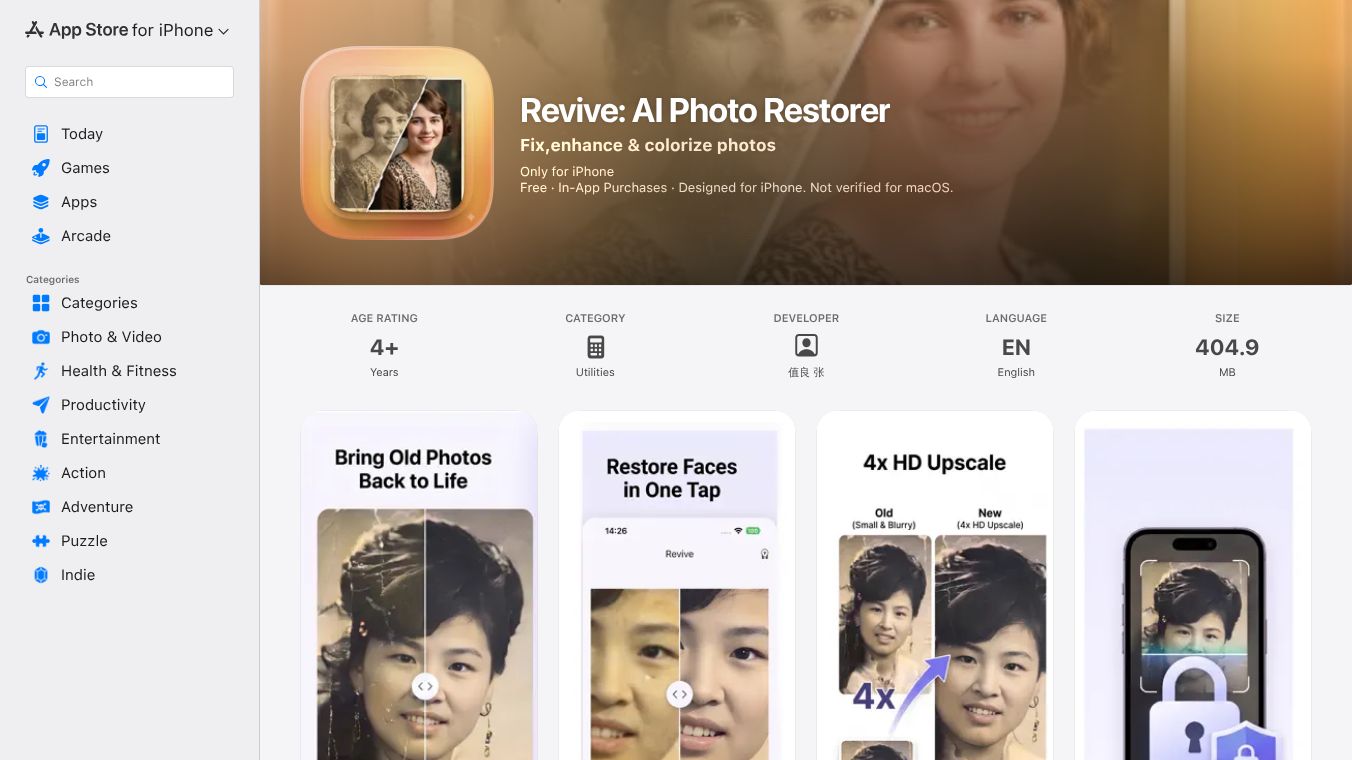
Revive is an application built for Apple devices like iPhones, iPod touches, Macs with M1 chips, and Apple Vision. It uses artificial intelligence to fix, enhance, and add color to old, blurry, or damaged photos. The main goal of the app is to bring faded memories back to life. Users can restore pictures of grandparents, clear up blurry snapshots from disposable cameras, or improve the only existing photo of a loved one. All of this happens quickly using smart technology that runs directly on the user's device.
Benefits
Revive offers several key advantages for anyone looking to improve their photo collection. The first major benefit is face restoration. The app uses powerful AI to rebuild blurry, scratched, or low-resolution faces with stunning detail. This works well for old family photos, scanned prints, and screenshots.
Another strong feature is the ability to sharpen and upscale images. The technology boosts the resolution of a photo up to four times. This transforms small, grainy images into crisp pictures that are ready for printing. The app also includes a colorization tool that adds vibrant colors to black-and-white photos, making historical images look fresh again.
Privacy is a huge selling point for Revive. The app processes every photo entirely on the user's device. Nothing is ever sent to a server, and no account is required to use the service. This means users can work offline without worrying about their personal data being uploaded to the cloud.
The interface is designed for simplicity. Users can pick a photo, tap a restore button, and see the before-and-after results instantly. There are no complex sliders or editing skills needed, making it easy for anyone to use.
Use Cases
Revive is perfect for people who want to preserve their digital memories without technical hassle. It is ideal for restoring old family albums where faces might be blurry or faded. Parents can use it to clear up blurry snapshots taken by children with disposable cameras. History buffs can colorize black-and-white photos to make them more engaging.
The app is also useful for anyone who has a single important photo of a loved one that has become damaged over time. By upscaling the image, users can create a high-quality version suitable for framing or printing. The one-tap operation makes it a quick solution for fixing photos before sharing them on social media or keeping them in a digital archive.
Pricing
Revive uses a freemium model, meaning some features are free while others require payment. Users can try full-quality restoration on their first photos for free. To get unlimited restorations, users can choose from the following plans:
- Weekly Plan: $4.99
- Yearly Plan: $19.99
- Lifetime Unlock: $39.99 (This is a one-time purchase that does not renew)
Payment is charged to the Apple ID account when the purchase is confirmed. Subscriptions will automatically renew unless turned off at least 24 hours before the current period ends.
Vibes
While there are no specific user reviews or testimonials included in the provided information, the app has received attention for its focus on privacy. The developer emphasizes that no data is collected from users, which appeals to those concerned about data security. The app is categorized as a utility tool and is rated for ages 4 and up, suggesting it is safe and easy for a wide range of users. The commitment to on-device processing and the lack of required accounts have been highlighted as key strengths by the developer.
Additional Information
Revive was developed by a developer named 值良 张. The app is available in English and has a file size of 404.9 MB. It requires iOS 15.5 or later for mobile devices and macOS 12.4 or later with an Apple M1 chip or later for Macs. For Apple Vision users, visionOS 1.0 or later is needed. The copyright for the app belongs to Revive 2026. The developer has made their privacy policy and terms of use available online for users to review.
This content is either user submitted or generated using AI technology (including, but not limited to, Google Gemini API, Llama, Grok, and Mistral), based on automated research and analysis of public data sources from search engines like DuckDuckGo, Google Search, and SearXNG, and directly from the tool's own website and with minimal to no human editing/review. THEJO AI is not affiliated with or endorsed by the AI tools or services mentioned. This is provided for informational and reference purposes only, is not an endorsement or official advice, and may contain inaccuracies or biases. Please verify details with original sources.


Comments
Please log in to post a comment.