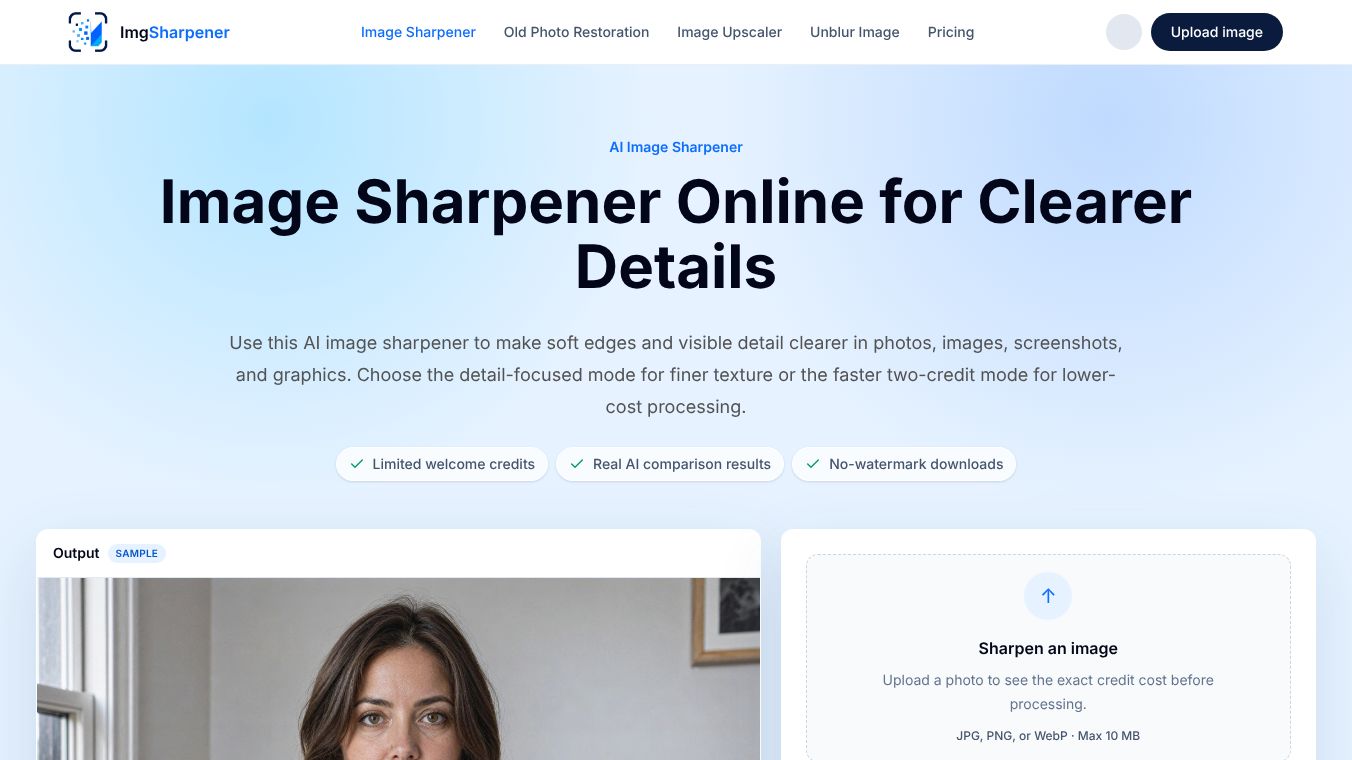





ImgSharpener: AI-Powered Image Enhancement and Restoration
Overview
ImgSharpener is an online platform that uses artificial intelligence to improve the quality of images. It helps users make blurry photos clearer, increase the resolution of small images, and restore old or faded pictures. The tool runs directly in a web browser, so users do not need to install any special software. This makes it easy for anyone to use for personal projects, professional work, or digital publishing. It is especially helpful for people who need to fix low-quality images for online stores, websites, social media posts, or presentations.
Benefits
ImgSharpener offers several key advantages for users who need to improve their images quickly and easily.
- Clearer Images:The AI technology reduces blur caused by poor focus or compression. This makes photos look sharper and more detailed.
- Higher Resolution:Users can increase the size of their images by two or four times without losing quality. This is useful when small photos need to be larger for printing or web use.
- Restoration of Old Photos:The tool can bring faded or damaged historical photographs back to life by removing stains and improving colors.
- No Software Needed:Since it runs in a browser, users can access it from any device with an internet connection. There is no need to download heavy programs.
- Watermark-Free Results:Users can download their enhanced images without any unwanted logos or watermarks added by the service.
- Privacy and Security:The platform includes features to ensure that only authorized users can access specific files. It also offers cloud storage and automatic backups to prevent data loss.
- Advanced Editing Tools:Beyond sharpening, the tool allows users to adjust colors, remove blemishes, fix lighting issues, and even remove unwanted objects from photos.
- Batch Processing:Users can edit multiple images at once, which saves time when working on large projects.
Use Cases
ImgSharpener is versatile and can be used in many different situations.
- E-commerce:Online sellers can use the tool to make product photos look professional and clear, which helps attract customers.
- Social Media:Users can enhance photos before posting them on platforms like Instagram or Facebook to ensure they look their best.
- Family Archives:People can restore old family scans and photographs to preserve memories for future generations.
- Web Design:Website owners can upscale small images to fit high-resolution screens without making the page load slowly.
- Presentations:Professionals can improve the quality of images used in business presentations or reports.
- Digital Publishing:Authors and publishers can ensure that images in books or articles are sharp and clear.
The platform supports common image formats like JPG, PNG, and WebP. It works well with portraits, architecture photos, screenshots, and graphics.
Pricing
ImgSharpener offers a Free Trial so users can test the platform before committing to a paid plan. Specific pricing details for subscriptions or credit packages are not publicly listed in the available information. Users can check the website to see the cost for specific tasks before they begin processing.
Vibes
While there are no specific customer reviews or testimonials available in the current data, the platform is designed with user experience in mind. The interface is built to be simple and accessible, avoiding complex editing jargon. The inclusion of a free trial suggests a willingness to let users evaluate the quality of the AI enhancements before paying. The focus on privacy controls and automatic backups indicates a commitment to keeping user data safe.
Additional Information
ImgSharpener was founded in 2026. It operates entirely as a web-based service, meaning it does not require an API for integration at this time. The platform includes several technical features to optimize performance, such as progressive rendering for faster initial display and support for high DPI screens. It also allows users to create named transformations for complex image edits and offers collaborative editing features for teams working together on documents and pictures.
This content is either user submitted or generated using AI technology (including, but not limited to, Google Gemini API, Llama, Grok, and Mistral), based on automated research and analysis of public data sources from search engines like DuckDuckGo, Google Search, and SearXNG, and directly from the tool's own website and with minimal to no human editing/review. THEJO AI is not affiliated with or endorsed by the AI tools or services mentioned. This is provided for informational and reference purposes only, is not an endorsement or official advice, and may contain inaccuracies or biases. Please verify details with original sources.
Comments
Please log in to post a comment.