Factualizer





Factualizer: A Chrome Extension for Academic-Style Article Analysis
Overview
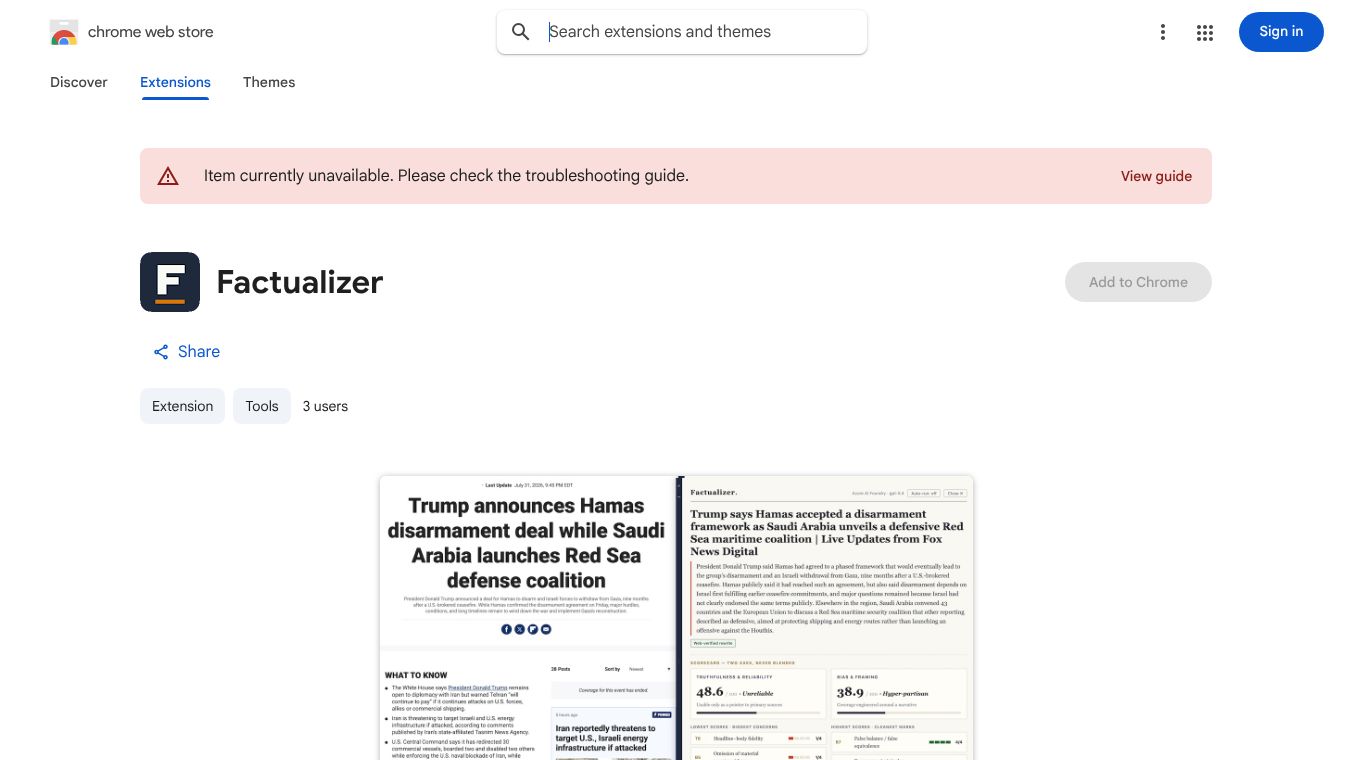
Factualizer is a Chrome extension designed to enhance the reading experience of online articles by automatically analyzing their content, researching claims, and presenting an academic-style evaluation panel at the top of the page. The tool aims to provide users with a structured second opinion on the truthfulness and reliability of the content they are consuming.
Benefits
When activated, Factualizer injects a panel containing three primary components. First, it generates a neutral headline and abstract supported by the article's body text. Second, the tool evaluates articles on two distinct axes. The first axis measures Truthfulness and Reliability with scores ranging from 0 to 4. The second axis measures Bias and Framing with scores also ranging from 0 to 4. These axes are never blended into a single number. Every sub-4 score is supported by exact quotes from the article. Third, the extension produces a rewritten version of the article that restores omitted context, removes loaded language and insinuation, and preserves the original literary style.
The scoring process is rigorous and automated. The Large Language Model first decomposes claims within the article. It then scores 19 article-level rubrics based on a specific template. For every score below 4, the system cites verbatim evidence from the text. Weighted subtotals are computed in code using a specific formula and normalized to a 100 scale per axis. These are then mapped to the template's interpretation bands. Providers without a research pass still generate the rewrite and scores, but the panel will be labeled Not web-verified.
Use Cases
Factualizer allows users to bring their own model by supporting various AI providers. Users can select a provider via the extension's Options menu. Supported providers include Chrome Built-in Gemini Nano, OpenAI, Anthropic, OpenRouter, Azure AI Foundry, and AWS Bedrock. Each provider has specific requirements for API keys or endpoints. For example, OpenAI and Anthropic require API keys from their respective platforms. OpenRouter allows users to use a key or a base URL for localhost servers. Azure AI Foundry and AWS Bedrock require specific endpoint URLs and access keys. Providers without a research pass still generate the rewrite and scores, but the panel will be labeled Not web-verified.
To install Factualizer, users must build the project by running npm install followed by npm run build. They then open chrome://extensions, enable Developer mode, and click Load unpacked. They select the dist folder generated in the previous step. Users click the Factualizer icon's Options to select their preferred AI provider. They can then open any article and click the Factualizer toolbar icon to generate the analysis panel.
Factualizer prioritizes user privacy. API keys and credentials are stored exclusively in chrome.storage.local. They are never synced across devices. Article text is sent only to the selected provider's endpoint over HTTPS and nowhere else. When using the Chrome built-in Gemini Nano, no data leaves the user's machine. Users are advised to treat browser-stored cloud credentials as sensitive and prefer scoped keys.
The extension is built with a specific technical structure. The background script handles orchestration and all network calls. The content script handles readability extraction and the Shadow-DOM panel injection. The options script manages the settings UI. The providers folder contains individual client implementations for each provider, unified behind an LLMClient interface. The lib folder includes the rubric engine, prompts, schema validation, pipeline logic, and settings management.
Pricing
Pricing details are not available in the provided information.
Vibes
Public reception, reviews, or testimonials are not available in the provided information.
Additional Information
Funding, partnerships, or notable achievements are not available in the provided information.
This content is either user submitted or generated using AI technology (including, but not limited to, Google Gemini API, Llama, Grok, and Mistral), based on automated research and analysis of public data sources from search engines like DuckDuckGo, Google Search, and SearXNG, and directly from the tool's own website and with minimal to no human editing/review. THEJO AI is not affiliated with or endorsed by the AI tools or services mentioned. This is provided for informational and reference purposes only, is not an endorsement or official advice, and may contain inaccuracies or biases. Please verify details with original sources.




 No Info
Comments
Please log in to post a comment.