Detectnix SiteSafe





Detectnix SiteSafe: AI-Powered Local PPE and Safety Equipment Scanning
Overview
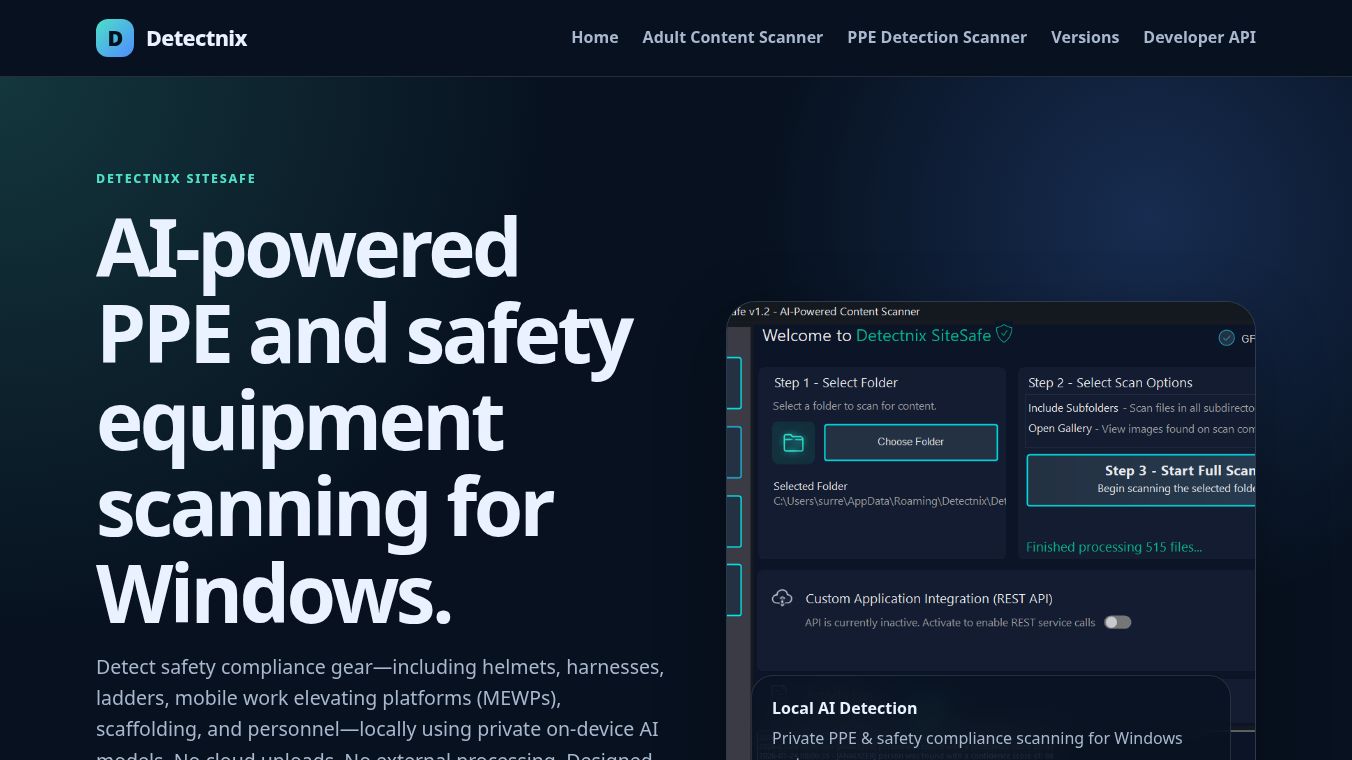
Detectnix SiteSafe is a privacy-first, AI-powered software solution designed for Windows systems to automatically scan and identify Personal Protective Equipment (PPE) and safety compliance gear. It is specifically tailored for site safety managers, safety auditors, and privacy-conscious industrial environments. The tool utilizes local on-device AI models, ensuring that no site photos are uploaded to the cloud or processed by external servers.
Benefits
Detectnix SiteSafe offers several key advantages for safety teams and auditors. Its most important feature is privacy. All image analysis happens entirely on the user's device. This means no site photos are uploaded to the cloud or shared with external servers. The software uses private AI models that work without needing an internet connection for processing. This ensures that sensitive site data remains secure and confidential.
The tool can identify a wide range of safety equipment and personnel in site images. It detects items such as helmets, harnesses, ladders, mobile work elevating platforms, scaffolding, and people. This comprehensive detection helps teams quickly assess safety compliance across a site. The software also supports optional GPU acceleration to handle large volumes of images efficiently. This makes it fast enough for processing entire directories of photos without significant delays.
Users can customize their scan settings and confidence thresholds before starting a scan. The interface provides a live activity log so users can watch the scan unfold in real time. Detected equipment can be reviewed in an optional image gallery. Scan results can be exported to CSV files or categorized folders. This provides a complete audit trail for compliance reports and safety audits.
Use Cases
Detectnix SiteSafe is ideal for site safety managers who need to verify that workers are wearing proper gear. Safety auditors can use the tool to quickly review thousands of site photos to ensure compliance with safety regulations. The software is perfect for industrial environments where privacy is a top concern and data cannot leave the local network.
The tool works well for companies that take many photos of construction sites or industrial facilities. It can scan entire folders and subfolders automatically. This saves time compared to manually checking each image. The ability to export results to CSV files makes it easy to include findings in formal reports. Safety teams can use the data to track trends and improve overall site safety over time.
The software runs on Windows 10 and Windows 11 systems. It supports common image formats like JPG, PNG, BMP, and WEBP. This flexibility allows teams to use photos from various cameras and devices without compatibility issues.
Pricing
Detectnix SiteSafe offers different versions to suit various needs. There is a free version that allows users to scan selected folders. This version includes local AI classification and GPU acceleration. The free version does not support recursive subfolder scanning or REST API integration.
The Retail edition is available as a one-time purchase. It adds support for recursive subfolder scanning, allowing users to process large directories automatically. The Enterprise edition is designed for business and API licensing needs. It includes all features from the free and retail versions plus REST API integration and enterprise automation support. Specific pricing for the Retail and Enterprise editions is not listed in the available information.
Vibes
The available information does not include specific customer reviews, testimonials, or public reception data for Detectnix SiteSafe.
Additional Information
Detectnix SiteSafe is designed for Windows 10 and Windows 11 64-bit systems. The minimum system requirements include a quad-core processor, 8 GB of RAM, and 2 GB of free storage space. The installation requires 400 MB of disk space. The software runs on the .NET 9 Desktop Runtime and requires the Visual C++ Redistributable dependency.
For better performance, the recommended system requirements include an 8-core Intel or AMD processor, 16 GB of RAM, and an SSD or NVMe SSD. An NVIDIA CUDA-capable GPU with at least 4 GB of VRAM is recommended for optimal speed. The software supports optional NVIDIA CUDA and DirectML acceleration for compatible GPUs.
The FAQ section confirms that the software will work on most computers, but users are encouraged to try the free trial version first to check system suitability. The trial version functions the same as the paid versions if the computer meets the requirements.
This content is either user submitted or generated using AI technology (including, but not limited to, Google Gemini API, Llama, Grok, and Mistral), based on automated research and analysis of public data sources from search engines like DuckDuckGo, Google Search, and SearXNG, and directly from the tool's own website and with minimal to no human editing/review. THEJO AI is not affiliated with or endorsed by the AI tools or services mentioned. This is provided for informational and reference purposes only, is not an endorsement or official advice, and may contain inaccuracies or biases. Please verify details with original sources.



Comments
Please log in to post a comment.