CrewTower





Crew Tower: Maintain Focus While Managing Multiple AI Agents
Overview
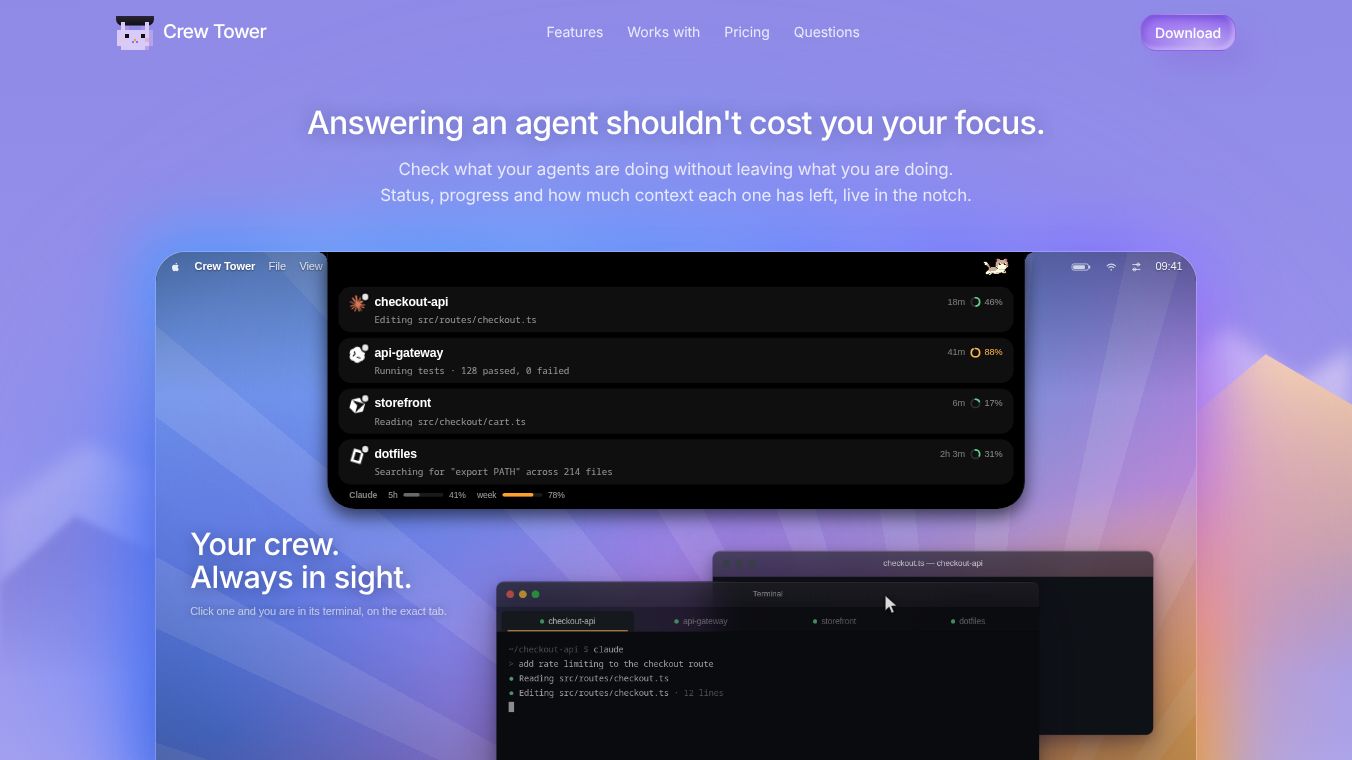
Crew Tower is a macOS utility designed to help developers manage multiple AI coding agents without losing their focus. It provides a persistent status bar at the top of the screen that displays the status, progress, and context usage of running agents. The tool allows users to approve commands, answer questions, and jump to specific terminal tabs without leaving their current workflow.
Benefits
Crew Tower offers several key advantages for developers who use AI tools. First, it provides non-intrusive monitoring through a persistent status bar that lives in the menu bar or notch. This bar shows session names, current tasks, time elapsed, and progress without requiring the user to switch windows. When an agent finishes or gets blocked, Crew Tower notifies the user immediately. Finished sessions announce their completion, while blocked sessions indicate what they are waiting for.
The tool also includes context awareness features. A visual ring on each card indicates context window usage. The ring turns amber when usage passes 70% and red when it exceeds 90%. This helps users monitor resource limits effectively. For interactive control, users can approve commands without touching the terminal. Decisions travel back to the agent via a local socket, resolving prompts in place without keystrokes in the app. Dangerous shell commands are highlighted before execution, allowing for a quick allow action to ensure safety.
Users have flexible approval options. They can approve a single command, allow the rest of the session without writing to disk, or set a durable rule for the project. When agents ask for input, options render as buttons. User selections are sent back verbatim in the format the agent expects. Users can also read the entire plan before execution, approve it to drop into edit mode, or provide notes for revision.
Terminal integration is another major benefit. Clicking a session brings the exact terminal tab to the front. This tab is identified by the title the agent wrote for itself. This works even when multiple agents share the same directory. Crew Tower supports a wide range of terminal emulators including Terminal, iTerm2, Ghostty, Kitty, Alacritty, WezTerm, Warp, and tmux panes. For unsupported terminals, a one-line configuration teaches Crew Tower how to interact.
Subscription management is handled seamlessly. The tool displays remaining subscription quota for Claude or Codex under the crew. It names the quota by account and reads numbers directly from the agent login credentials without requiring a second sign-in.
Privacy and security are top priorities. Crew Tower uses a local-first architecture. Code, transcripts, and prompts never leave the Mac. Sessions are read from local agent writes, and decisions travel over a Unix socket restricted to the user account. The tool does not send usage data or code details to external servers. Network calls are limited to checking for new versions once daily and license validation at most once daily. Only Accessibility permission is requested to bring the correct terminal tab to the front. Approving, denying, or answering commands requires no permissions. The installation process is clean. Activating Crew Tower writes observation hooks to agent config files. A backup is created before changes, and removing the app restores the original configuration.
Use Cases
Crew Tower is ideal for developers who run multiple AI coding agents simultaneously. It is particularly useful for those who want to maintain focus while managing complex workflows. The tool allows users to monitor several sessions at a glance without constantly switching between windows. This is helpful when working on large projects that require multiple AI agents to handle different parts of the codebase.
Developers who use Claude Code, Codex, or Cursor will find native support for these agents. The tool works well for teams that need to review AI-generated code before execution. The plan review feature lets users read the entire plan before execution, approve it to drop into edit mode, or provide notes for revision. This ensures that AI suggestions align with project requirements.
The tool is also beneficial for users who need precise control over terminal interactions. By clicking a session, users can bring the exact terminal tab to the front. This is useful when multiple agents are working in the same directory. The wide terminal support ensures compatibility with various environments. Users can configure the tool for unsupported terminals with a simple one-line setup.
For developers concerned about privacy, Crew Tower offers a secure environment. The local-first architecture ensures that sensitive code and prompts remain on the local machine. This is important for projects with strict data security requirements. The minimal permissions model further enhances security by limiting access to only what is necessary.
Pricing
Crew Tower is available as a one-time purchase priced at $9.99. This is an early bird price, originally set at $14.99. The purchase is a single payment, not a subscription. Users can request a full refund within 30 days if the software does not meet their needs. No user account is needed to use the software.
Vibes
While specific reviews and testimonials are not available in the provided information, the tool has been designed with user feedback in mind. The focus on privacy, security, and ease of use suggests a positive reception among developers who value these features. The one-time purchase model and money-back guarantee indicate confidence in the product's value.
Additional Information
Crew Tower is built with Swift and SwiftUI. It does not use Electron or web views. Animations pause when the bar is covered, and marks only redraw while sessions are active. Sessions persist across restarts. Quitting mid-run and relaunching restores the crew to the correct state. The tool supports subagents, and when a session spawns subagents, the card displays the count. This turns silence into progress indicators. The platform requirement is macOS 15 or later. It works on Macs with notches and external monitors. External monitors use a floating pill interface with identical geometry.
This content is either user submitted or generated using AI technology (including, but not limited to, Google Gemini API, Llama, Grok, and Mistral), based on automated research and analysis of public data sources from search engines like DuckDuckGo, Google Search, and SearXNG, and directly from the tool's own website and with minimal to no human editing/review. THEJO AI is not affiliated with or endorsed by the AI tools or services mentioned. This is provided for informational and reference purposes only, is not an endorsement or official advice, and may contain inaccuracies or biases. Please verify details with original sources.
Comments
Please log in to post a comment.