Auto-Harness
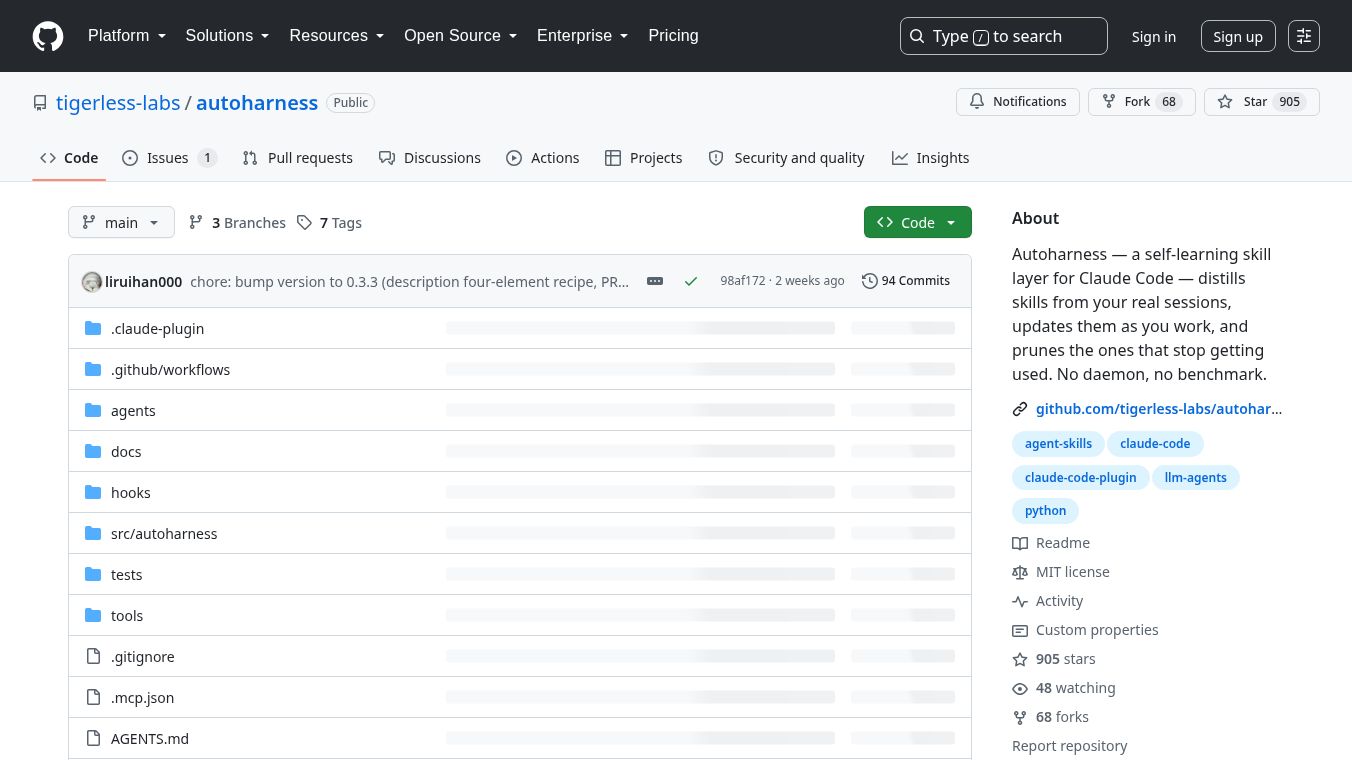





AutoHarness: A Self-Learning Skill Layer for Claude Code
Overview
AutoHarness is a smart tool designed to work with Claude Code, an AI coding assistant. It acts like a personal tutor that learns from your actual work sessions. Instead of storing every single thing you do, it groups similar tasks together and updates them as you go. It also automatically removes skills that are no longer needed. This keeps the system clean and efficient without you having to manage it manually.
Unlike older methods that require rebuilding models from scratch, AutoHarness manages its own knowledge base on its own. While standard methods might achieve about 42% accuracy on coding tasks, AutoHarness reaches 78% accuracy by focusing on maintaining a clean and self-sustaining skill layer.
Benefits
AutoHarness offers several key advantages for developers who use AI coding tools.
First, it learns from real work. Every time you work on a project, the tool captures that session and turns it into a skill. There is no need for separate data collection or replay loops. The system learns as you work naturally.
Second, it organizes information smartly. When you encounter a similar task again, the tool does not create a duplicate entry. Instead, it updates the existing skill to include the new information. This prevents the system from becoming cluttered with near-duplicates.
Third, it validates skills through actual use. A skill stays active based on how often you use it, not on a test score. This means the tool focuses on what actually helps you work better.
Fourth, it keeps your manual skills safe. AutoHarness only manages the skills it creates. Any skills you write or install by hand are left completely alone and are never changed by the system.
Finally, it keeps a clear record of its actions. Every time a skill is created or updated, the tool logs the reason and the evidence. This creates a paper trail that can be reviewed later if needed.
Use Cases
AutoHarness is designed for developers who use Claude Code to write or debug software. It works best in environments where you repeat similar coding tasks often.
For example, if you frequently run into the same type of bug or need to configure a specific tool, AutoHarness will learn from your solution. The next time you face a similar problem, the tool will recall the skill and help you solve it faster.
It is also useful for teams that want to build a shared knowledge base. Since skills are stored in a structured way, team members can benefit from the collective experience of the group without manually documenting every step.
The tool runs in the background and does not interfere with your workflow. You can install it with a few simple commands, and it will start watching your sessions automatically.
Pricing
AutoHarness is currently available as an open-source project on GitHub. It is free to use for individuals and teams. The tool is maintained by Tigerless Labs and is hosted at the GitHub repository tigerless-labs/autoharness.
Vibes
The AutoHarness project has received positive attention from the developer community. It has gathered 905 stars on GitHub, which indicates strong interest from users. The project has 48 people watching for updates, showing that it is an active area of interest.
Developers appreciate the tool because it solves a real problem: how to make AI coding assistants smarter over time without manual effort. The approach of learning from real work sessions rather than benchmarks is seen as a practical and efficient solution.
Additional Information
AutoHarness was built by Tigerless Labs. The project is open-source and available for anyone to use or contribute to. It requires Python 3 to run and has no third-party dependencies. This makes it easy to install and use in most development environments.
The tool is designed to be lightweight and does not require a separate server or daemon to run. It operates directly within the Claude Code environment. Users can configure the tool using environment variables if they want to change how it learns or how often it updates. The default settings are designed to work well for most users without any changes.
To install the tool, users can add it to the Claude Code plugin marketplace and then install it with a simple command. After installation, the tool will begin working in the background and will save learned skills to a local directory. Users can also uninstall the tool easily if they no longer need it, though the skills it created will remain on disk unless manually deleted.
This content is either user submitted or generated using AI technology (including, but not limited to, Google Gemini API, Llama, Grok, and Mistral), based on automated research and analysis of public data sources from search engines like DuckDuckGo, Google Search, and SearXNG, and directly from the tool's own website and with minimal to no human editing/review. THEJO AI is not affiliated with or endorsed by the AI tools or services mentioned. This is provided for informational and reference purposes only, is not an endorsement or official advice, and may contain inaccuracies or biases. Please verify details with original sources.
Comments
Please log in to post a comment.