typeUp
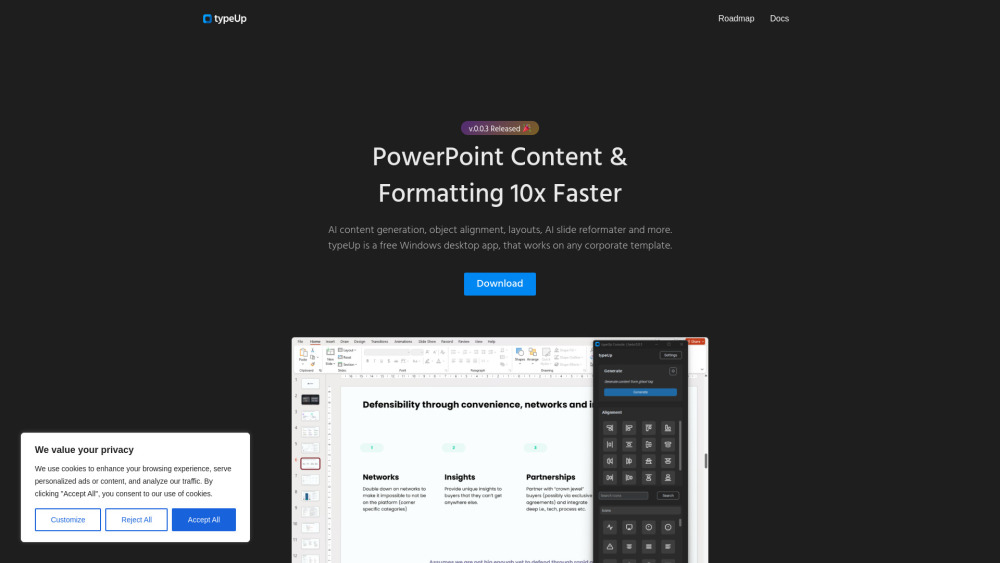





typeUp is an innovative tool designed to streamline PowerPoint content creation and formatting. It's a free Windows desktop application that integrates with OpenAI's ChatGPT to provide AI-powered content generation. typeUp works seamlessly with any corporate PowerPoint template, allowing users to quickly create professional-looking slides. The app offers features like type commands for content generation, alignment functions, layout templates, and an auto-formatting 'Beautify' option to transform slides instantly.
typeUp is a free Windows desktop application that enhances PowerPoint productivity through AI-powered content generation, formatting, and slide design. It integrates with OpenAI/ChatGPT for content creation, offers alignment tools, pre-built layouts, and an icon library. The app runs locally, works with any corporate template, and aims to speed up PowerPoint content creation and formatting by 10x.
Highlights:
- AI-powered content generation with OpenAI/ChatGPT integration
- Enhanced alignment tools for better slide design
- Pre-built layout library for quick slide formatting
- Auto-formatting 'Beautify' function
- Icon library with 287 SVG icons
Key Features:
- AI Content Generation: Uses OpenAI/ChatGPT integration to generate slide content directly within PowerPoint using @text commands
- Enhanced Alignment Tools: Extends PowerPoint's native alignment functions with additional options like arranging objects in grids or circles
- Pre-built Layout Library: Offers a growing collection of layout templates for quick insertion and slide design
- Beautify Function: Automatically reformats and reorganizes slide content to improve appearance using appropriate layouts
- Icon Library: Includes 287 SVG icons from the Feather icon set, customizable within PowerPoint
Benefits:
- Significant time-saving potential for PowerPoint users
- Works with existing corporate templates
- Local app installation for data privacy (except when using AI generation)
- Quickly generate professional-looking slides
- Enhanced alignment and formatting tools
Use Cases:
- Corporate Presentations: Quickly generate professional-looking slides that adhere to company templates and branding guidelines
- Content Marketing: Rapidly produce slide decks for webinars, product launches, or social media content with AI-generated text
- Education: Create engaging lecture slides or educational materials with consistent formatting and rich content
- Sales Pitches: Design impactful sales presentations with polished layouts and AI-assisted content tailored to specific prospects
- Personal Use: Streamline personal slide creation for various purposes
This content is either user submitted or generated using AI technology (including, but not limited to, Google Gemini API, Llama, Grok, and Mistral), based on automated research and analysis of public data sources from search engines like DuckDuckGo, Google Search, and SearXNG, and directly from the tool's own website and with minimal to no human editing/review. THEJO AI is not affiliated with or endorsed by the AI tools or services mentioned. This is provided for informational and reference purposes only, is not an endorsement or official advice, and may contain inaccuracies or biases. Please verify details with original sources.
 No Info

Comments
Please log in to post a comment.