ToolSDK.ai
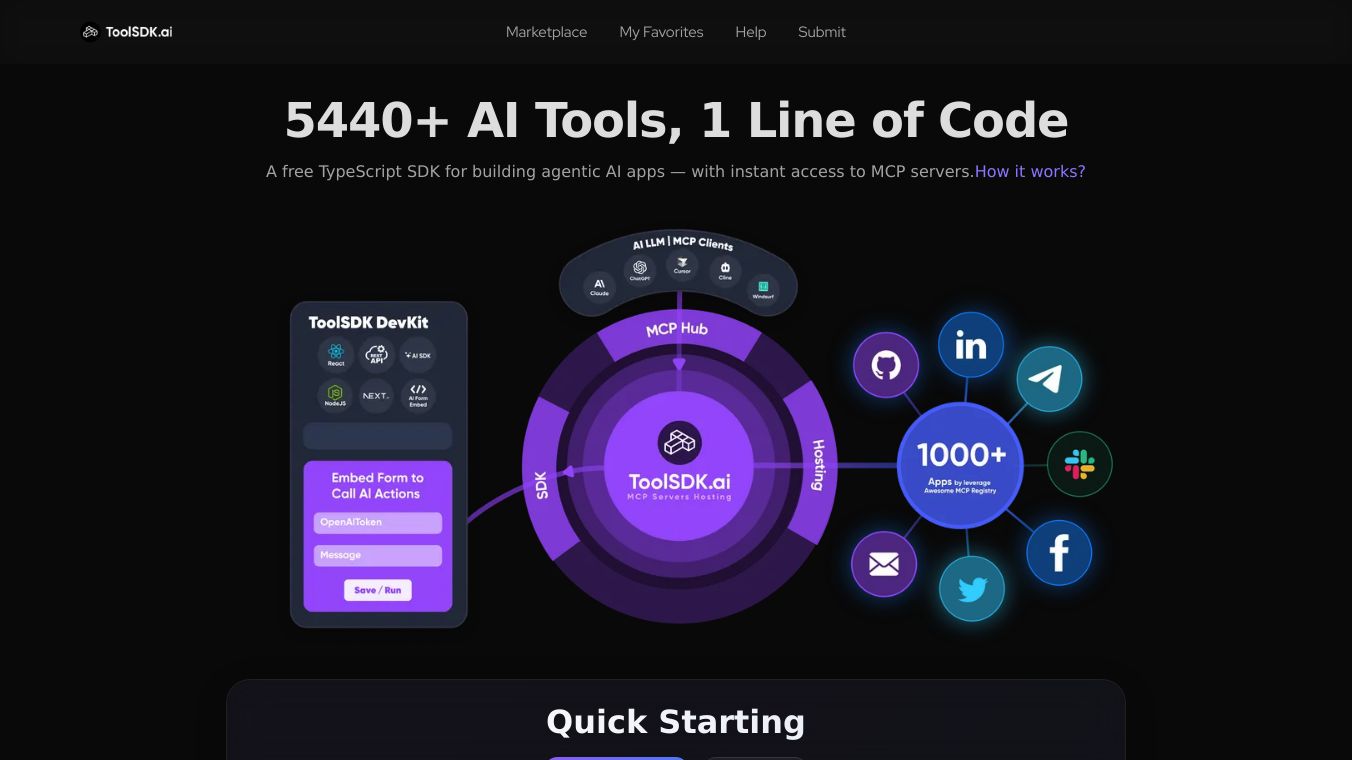





ToolSDK.ai: Simplifying AI Integration for Developers
ToolSDK.ai is a free TypeScript software development kit (SDK) designed to make it easier for developers to integrate and manage Model Context Protocol (MCP) servers with AI tools. It allows developers to access over 5,000 MCP servers and 10,000 AI tools with just one line of code. This makes it a great choice for building AI agents or automated workflows quickly and efficiently.
Benefits
ToolSDK.ai offers several key advantages:
- Easy Integration: Connect to thousands of MCP servers and AI tools with minimal code.
- Framework Support: Works seamlessly with popular frameworks like Next.js, React, Svelte, and Node.js.
- Customization: Add custom MCP servers via GitHub repositories to extend functionality.
- Automation: Build automated workflows similar to tools like Zapier or n8n.
- AI Agent Development: Quickly create AI agents that can handle complex tasks.
Use Cases
ToolSDK.ai is versatile and can be used in various scenarios:
- AI Agent Development: Developers can build AI agents that connect to various APIs and tools to automate tasks. For example, an AI agent could fetch data from GitHub and generate reports using AI models.
- Automated Workflows: Organizations can create automated workflows to streamline processes. For instance, monitoring GitHub repositories for updates and automatically notifying teams via Slack.
- Custom Tool Integration: Developers can add custom MCP servers to connect to internal databases or third-party APIs, tailoring the tool to specific business needs.
Installation Process
To get started with ToolSDK.ai, follow these steps:
- Prepare Your Environment: Ensure you have Node.js 18+ and the pnpm package manager installed.
- Install ToolSDK.ai: Use npm to add ToolSDK.ai to your project.
- Configure Environment Variables: Set up any required API keys, such as those needed for the GitHub API.
Using ToolSDK.ai
ToolSDK.ai simplifies the process of connecting to MCP servers and building AI agents or automated workflows. Here are some key features:
- One-Line Connection: Connect to an MCP server with a single line of code.
- AI Agent Building: Combine AI models with MCP servers to create intelligent agents that can handle complex tasks.
- Automated Workflows: Set up automated processes to streamline tasks, such as sending updates from GitHub to Slack.
- Custom MCP Servers: Add your own MCP servers via GitHub repositories to extend the tool's capabilities.
Vibes
ToolSDK.ai has been well-received for its simplicity and efficiency. Users appreciate the ease of integrating multiple AI tools and MCP servers, making it a valuable tool for developers looking to build AI agents or automated workflows quickly.
Additional Information
ToolSDK.ai is free to use, with some MCP servers requiring API keys or paid subscriptions for premium features. The tool is continuously expanding its ecosystem, so developers are encouraged to check for updates regularly. For more details, visit theToolSDK.ai website.
This content is either user submitted or generated using AI technology (including, but not limited to, Google Gemini API, Llama, Grok, and Mistral), based on automated research and analysis of public data sources from search engines like DuckDuckGo, Google Search, and SearXNG, and directly from the tool's own website and with minimal to no human editing/review. THEJO AI is not affiliated with or endorsed by the AI tools or services mentioned. This is provided for informational and reference purposes only, is not an endorsement or official advice, and may contain inaccuracies or biases. Please verify details with original sources.
Comments
Please log in to post a comment.