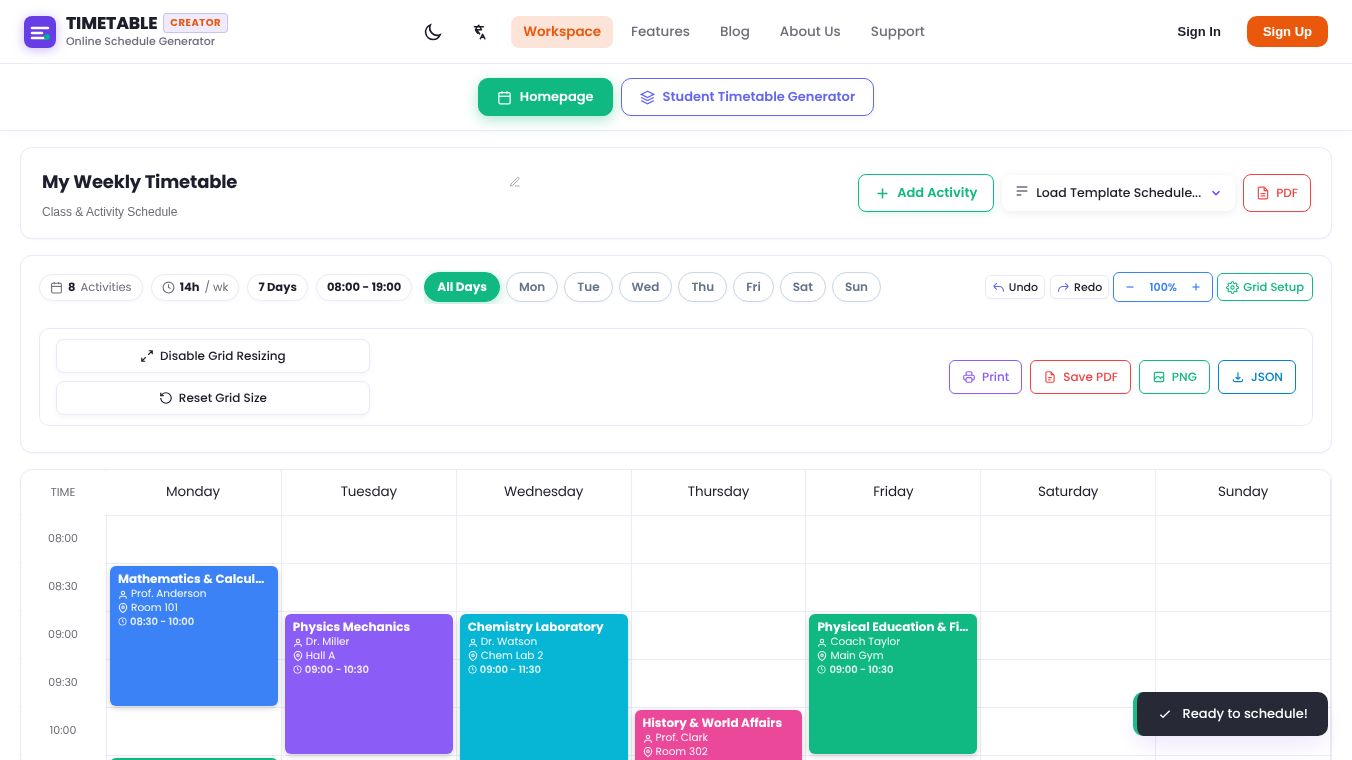





Timetable Creator: A Simple Tool for Organizing Your Schedule
Introduction
Timetable Creator is an online tool designed to help people build and manage their schedules easily. It is a website that allows users to create custom timetables without needing any special software or technical skills. The platform focuses on making the process of organizing time simple and accessible for everyone. Whether you are a student, a teacher, or someone managing a busy work life, this tool provides a straightforward way to plan your day or week. It runs directly in your web browser, so you can access it from any device with an internet connection.
Benefits
The main advantage of using Timetable Creator is its ease of use. The interface is clean and intuitive, meaning users can start building a schedule in just a few clicks. It removes the complexity often found in other scheduling software. Users can add classes, meetings, or personal events and arrange them in a grid format that is easy to read. The tool also allows for customization, so you can change colors or add notes to specific time slots. This helps in keeping track of important details at a glance. Because it is web-based, there is no need to download or install anything on your computer. You can access your timetable from anywhere, which is helpful for people who work or study remotely. The free version of the tool offers enough features for most users to manage their daily needs effectively.
Use Cases
Timetable Creator is useful for a wide range of people. Students can use it to organize their class schedules, exam times, and study sessions. Teachers can create lesson plans or manage their daily teaching roster. Parents might use it to keep track of their children's activities, sports practice times, and school events. Small business owners can also use the tool to plan their work hours or schedule client meetings. The grid layout makes it perfect for visual learners who prefer seeing their time laid out in blocks rather than a simple list. It is also helpful for anyone who needs to coordinate multiple events in a single day. By having everything in one place, users can avoid double-booking or missing important appointments.
Pricing
Timetable Creator offers a free version that includes basic scheduling features. This allows users to create unlimited timetables and save them to their browser. There is no cost to start using the tool. While there may be premium options available for advanced features, the core functionality remains accessible to everyone without a subscription fee. This makes it a budget-friendly choice for individuals who need a reliable way to organize their time without spending money on expensive software.
Vibes
Users generally appreciate the simplicity and speed of Timetable Creator. Many people find it helpful for quickly setting up a schedule without the learning curve associated with more complex apps. The ability to access the tool from any device is a major plus for those who are always on the go. While some users might wish for more advanced features like calendar syncing or mobile apps, the basic version is often enough for everyday planning. The community feedback suggests that it is a solid choice for anyone looking for a no-frills way to manage their time online.
Additional Information
Timetable Creator operates as a standalone web application. It does not require registration to use the basic features, which lowers the barrier to entry for new users. The platform is maintained by a team focused on providing simple, utility-based tools for daily life. There are no known major partnerships or funding announcements that have significantly changed its operation. The focus remains on delivering a reliable, free service for schedule management.
This content is either user submitted or generated using AI technology (including, but not limited to, Google Gemini API, Llama, Grok, and Mistral), based on automated research and analysis of public data sources from search engines like DuckDuckGo, Google Search, and SearXNG, and directly from the tool's own website and with minimal to no human editing/review. THEJO AI is not affiliated with or endorsed by the AI tools or services mentioned. This is provided for informational and reference purposes only, is not an endorsement or official advice, and may contain inaccuracies or biases. Please verify details with original sources.




 No Info
Comments
Please log in to post a comment.