Tailride
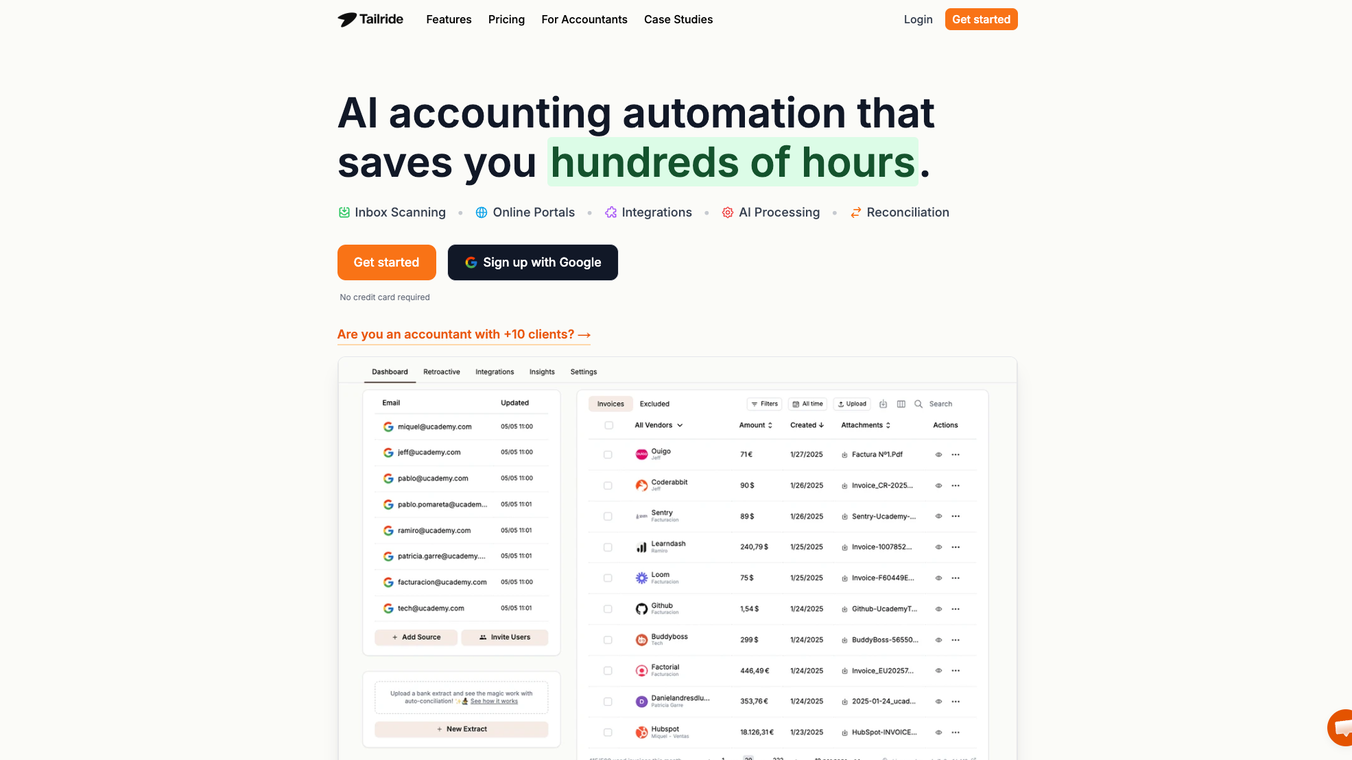





Tailride Overview
Tailride is an AI-driven software that simplifies invoice and receipt management for businesses. It pulls data straight from emails, online portals, and even paper receipts, then organizes everything in one spot. Teams can ditch the manual hassle of chasing down documents, especially during busy times like tax season or quarter-ends. This tool stands out for its seamless integrations and smart automation, making it a go-to for finance folks who want to focus on bigger tasks.
Highlights
- Automates 99% of invoice handling with AI, from capture to extraction.
- Connects natively to Gmail, Outlook, and other email services without storing your data.
- Handles diverse sources: emails, paper photos via bots, and one-click pulls from sites like Amazon or Adobe.
- GDPR-compliant and secure, with data staying in your control.
- Replaces a bunch of other tools like Dext or Hubdoc for a more complete solution.
Key Features
Tailride packs a lot into its dashboard. It scans your inbox for invoices in PDFs, images, or links, and lets you search back through past emails by date ranges. For paper receipts, just snap a photo and send it via WhatsApp or Telegram bots—multiple team members can join in. The Chrome extension grabs invoices from online accounts without needing logins or passwords. You can set custom rules, like tagging expenses to projects or skipping certain vendors. It also matches invoices to bank statements, handling things like currency conversions. Finally, it forwards everything automatically to accounting software or cloud storage.
Benefits
This tool saves serious time—think hundreds of hours a month by cutting out data entry and endless searching. It reduces errors that come from manual work, keeping your books accurate and compliant for taxes. Finance teams get full visibility without the chaos, and accountants end up happier with less grunt work. Plus, it's flexible for growing companies, handling high volumes from various sources all in one place. Security is a big win too, with EU-based data storage and no unnecessary access to your emails.
Use Cases
Tailride shines in real-world scenarios. For quarter-end rushes, it captures every invoice automatically so you're not scrambling for missing ones. Small teams use it for expense tracking: employees send receipt photos, and the AI matches them to bank statements to spot gaps. Online shoppers or ad buyers pull invoices from portals like Meta or ChatGPT with a single click. Businesses with custom needs set rules to tag invoices for projects, like separating Shopify costs. It's also great for tax prep, as seen with companies like ucademy.com, where it turned manual drudgery into smooth automation.
Vibes
Tailride feels like a quiet, reliable assistant working behind the scenes. The interface is clean and straightforward—no clutter or steep learning curve. It gives off a sense of efficiency and trust, like it's built for busy pros who value simplicity over flash. Users rave about how it just "works ridiculously well," making invoice management feel effortless and almost invisible once set up.
Pricing and Getting Started
You can start for free, which is a nice entry point to test the waters. Plans scale based on invoice volume—if you hit limits, upgrade or buy extra credits that never expire. They offer a 3-day full refund policy, and payments go through Stripe for ease. Check their site for exact tiers, but it's designed to be affordable for teams of all sizes.
Integrations
Tailride plays well with popular tools. It forwards invoices to QuickBooks, Xero, or Business Central, and exports to Google Drive, Sheets, or OneDrive. Email support covers Gmail and Outlook, with IMAP for others. The bots work with WhatsApp and Telegram, and the extension handles sites like Amazon, Notion, and Microsoft.
If you're tired of invoice headaches, Tailride could be the fix. Head over to their site to see it in action and give it a spin—it's quick to set up and might just change how your team handles finances.
This content is either user submitted or generated using AI technology (including, but not limited to, Google Gemini API, Llama, Grok, and Mistral), based on automated research and analysis of public data sources from search engines like DuckDuckGo, Google Search, and SearXNG, and directly from the tool's own website and with minimal to no human editing/review. THEJO AI is not affiliated with or endorsed by the AI tools or services mentioned. This is provided for informational and reference purposes only, is not an endorsement or official advice, and may contain inaccuracies or biases. Please verify details with original sources.


 No Info


Comments
Please log in to post a comment.