Solair AI
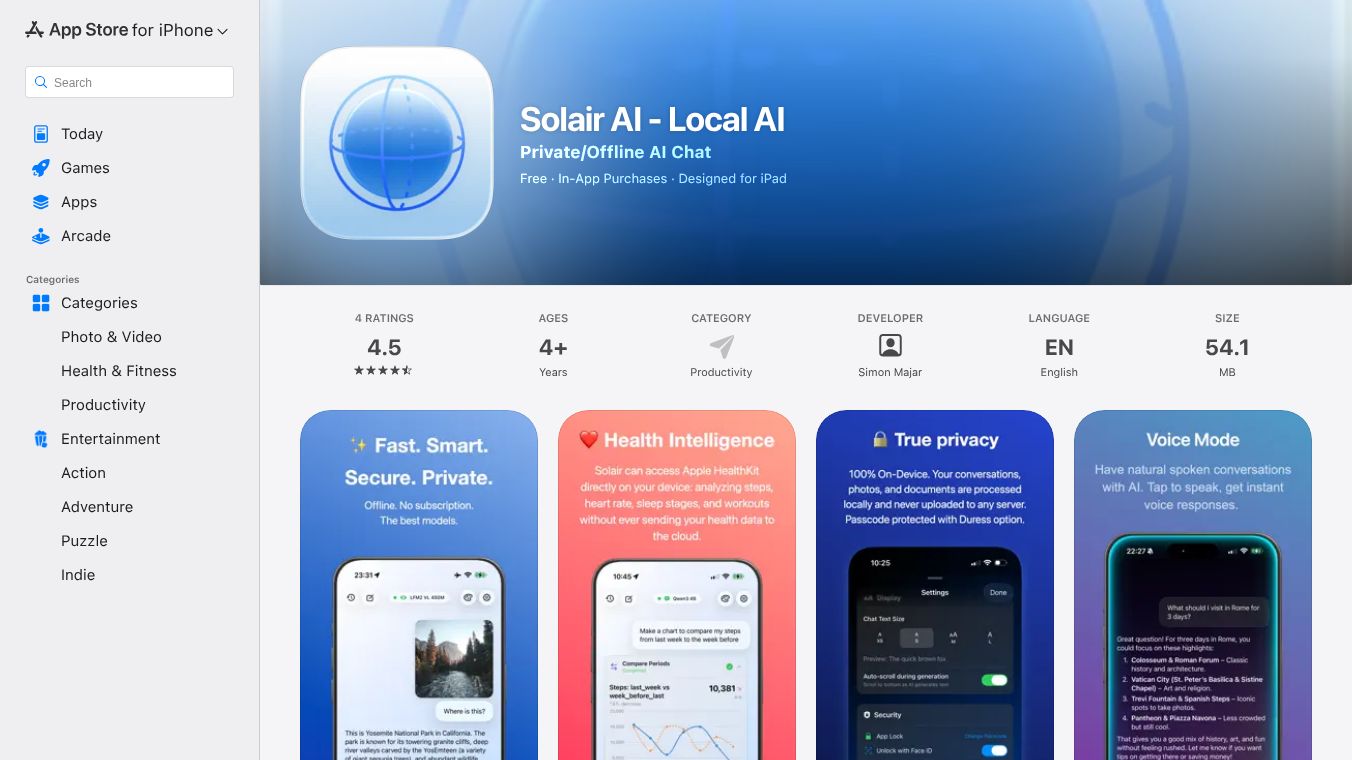





Solair AI is a free application that brings advanced artificial intelligence to your iPhone, iPad, and Mac. It focuses heavily on keeping your information private by processing everything directly on your device. This means your conversations, pictures, health details, and documents never leave your phone or computer, so no one, not even the people who made the app, can see them. Once you download the AI models, you can use the app even without an internet connection.
Benefits
Solair AI offers complete privacy because all the AI work happens on your device. It has an Auto Mode that smartly picks the best AI for your needs, giving quick answers for simple questions and handling complex problems or image analysis. You can talk to the AI using your voice in a beta Voice Mode and get instant spoken replies. The app can also look at your health data from Apple Health to give you reports and see trends, though this is just for information and not medical advice. It can analyze images, read documents, and remember your personal facts and preferences to make conversations more helpful.
Use Cases
This app is great for anyone who wants to use AI without worrying about their data being sent to servers. You can use it to understand your health information, analyze documents or photos, get help with coding, or just have a private conversation with an AI. It's useful for tasks requiring quick answers, deep thinking, or visual understanding, all while keeping your information secure on your device. It also offers an optional way to search the web for current information privately.
Pricing
Solair AI is free to use and has no advertisements. While you can choose to give optional tips to support the developer, this does not unlock any extra features. There are in-app purchases available for tipping the developer.
Vibes
Users have called Solair AI a top choice for running AI models locally on iPhones. They appreciate its attractive design, the wide selection of AI models available, and its many features. Some users have mentioned small issues with voice mode and getting data, but the developer is working on fixing these in updates.
This content is either user submitted or generated using AI technology (including, but not limited to, Google Gemini API, Llama, Grok, and Mistral), based on automated research and analysis of public data sources from search engines like DuckDuckGo, Google Search, and SearXNG, and directly from the tool's own website and with minimal to no human editing/review. THEJO AI is not affiliated with or endorsed by the AI tools or services mentioned. This is provided for informational and reference purposes only, is not an endorsement or official advice, and may contain inaccuracies or biases. Please verify details with original sources.
Comments
Please log in to post a comment.