Sesori
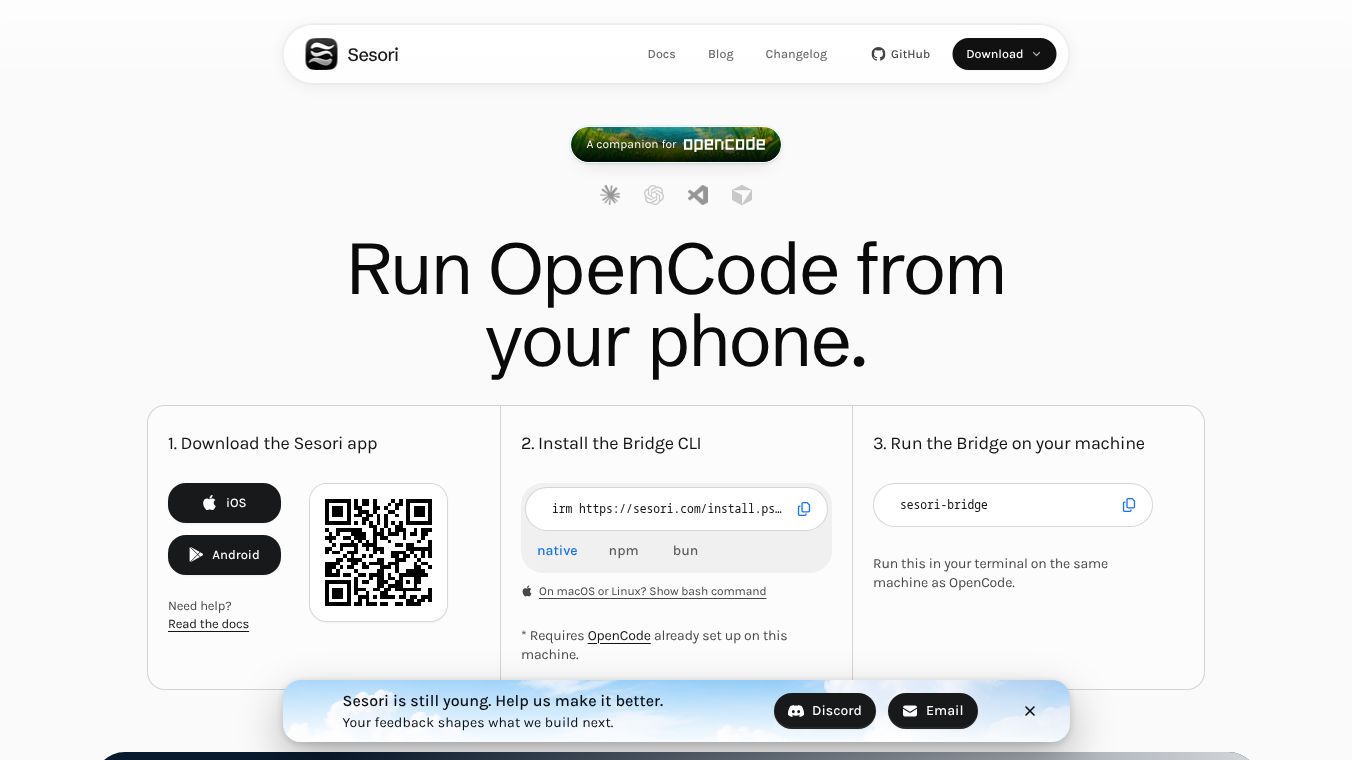





Sesori: A Local-First Mobile Cockpit for AI Coding Sessions
Overview
Sesori is a mobile client designed to serve as a companion for OpenCode, an AI coding assistant. It functions as a local-first mobile interface that allows developers to review, steer, and continue coding sessions from their phones without replacing their desktop environment. Unlike cloud-based IDEs or desktop assistants, Sesori sits beside these tools, providing a native mobile workflow deeply integrated with the user's real dev environment: their laptop, repository, terminal, and AI coding tool.
Benefits
Sesori offers several key advantages for developers who want to stay connected to their work on the go. It enables users to access their laptop's projects from their phone. Developers can run OpenCode from their mobile device and keep long-running agents moving even when they are away from their laptop. The app allows users to review every session at a glance and pick up exactly where they left off, ensuring continuity across devices. Another major benefit is voice-first interaction. The app supports voice commands, allowing users to speak instructions and answer AI prompts naturally without ever touching a keyboard. Security and privacy are also top priorities. The core functionality relies on a bridge running on the user's machine, ensuring no cloud dependency for the coding logic. All traffic between the phone and the laptop is end-to-end encrypted. This means your code never leaves your control, and the app is not a cloud sandbox. It interfaces directly with the local environment.
Use Cases
Sesori is designed for developers who need to manage their coding sessions remotely. It is useful for anyone who wants to check on a long-running task while away from their desk. For example, a developer can start a complex code generation task on their laptop and then use their phone to monitor progress or provide feedback while commuting or at a coffee shop. The app is also ideal for users who prefer voice commands over typing. A developer can guide a coding session naturally by speaking instructions to their phone. The bridge architecture ensures that the mobile app does not talk to OpenCode directly. Instead, a bridge CLI runs on the user's laptop to expose the local OpenCode session to the phone over an encrypted relay. This setup allows connections from anywhere, not just the same network as the laptop. The bridge also delivers push notifications to the phone when a session requires input or when a long-running task finishes. This makes it perfect for staying updated on critical development tasks without being tied to a specific location.
Pricing
Sesori does not currently list specific pricing details for its mobile app or bridge CLI. Users can sign in using accounts like Apple, Google, GitHub, or email. For those who are not yet ready to install the app, Sesori offers a subscription to receive one short email notification when something worth their time is shipped, including new agent integrations and major releases. Full installation instructions and support are available through the official documentation or by contacting support directly.
Vibes
Sesori is explicitly not a mobile IDE, a cloud sandbox, or a replacement for a desktop assistant. It is strictly a mobile interface for the user's existing local development setup. The design philosophy focuses on phone-first control of AI coding sessions that continue to run on the laptop. The app prioritizes user security and data privacy by ensuring all communication between the phone and laptop is end-to-end encrypted. If a phone is lost or stolen, users can sign out of the account used for Sesori or revoke the session from their account provider. For email sign-ins, changing the password invalidates the session. Users can also delete their account via the app or by emailing support. This approach gives users full control over their data and ensures that their code remains secure and private.
Additional Information
Sesori operates using a bridge architecture where the mobile app does not talk to OpenCode directly. Instead, a bridge CLI runs on the user's laptop to expose the local OpenCode session to the phone over an encrypted relay. The bridge must live on the laptop for several reasons. It exposes the local OpenCode session to the phone, enabling connections from anywhere, not just the same network as the laptop. It delivers push notifications to the phone when a session requires input or when a long-running task finishes. It serves as the mechanism to add new assistants without requiring updates to the mobile app itself. The bridge also manages compatibility with new OpenCode versions, allowing Sesori to ship updates without waiting for Apple or Google review cycles. To get started, users must install the bridge CLI on their laptop and pair it with the Sesori mobile app. Installation is straightforward for macOS, Linux, and Windows users. The bridge only needs to run when the user wants their phone to view the session. This flexible setup ensures that developers can integrate Sesori into their existing workflow without significant changes to their current tools.
This content is either user submitted or generated using AI technology (including, but not limited to, Google Gemini API, Llama, Grok, and Mistral), based on automated research and analysis of public data sources from search engines like DuckDuckGo, Google Search, and SearXNG, and directly from the tool's own website and with minimal to no human editing/review. THEJO AI is not affiliated with or endorsed by the AI tools or services mentioned. This is provided for informational and reference purposes only, is not an endorsement or official advice, and may contain inaccuracies or biases. Please verify details with original sources.

Comments
Please log in to post a comment.