RobinHub
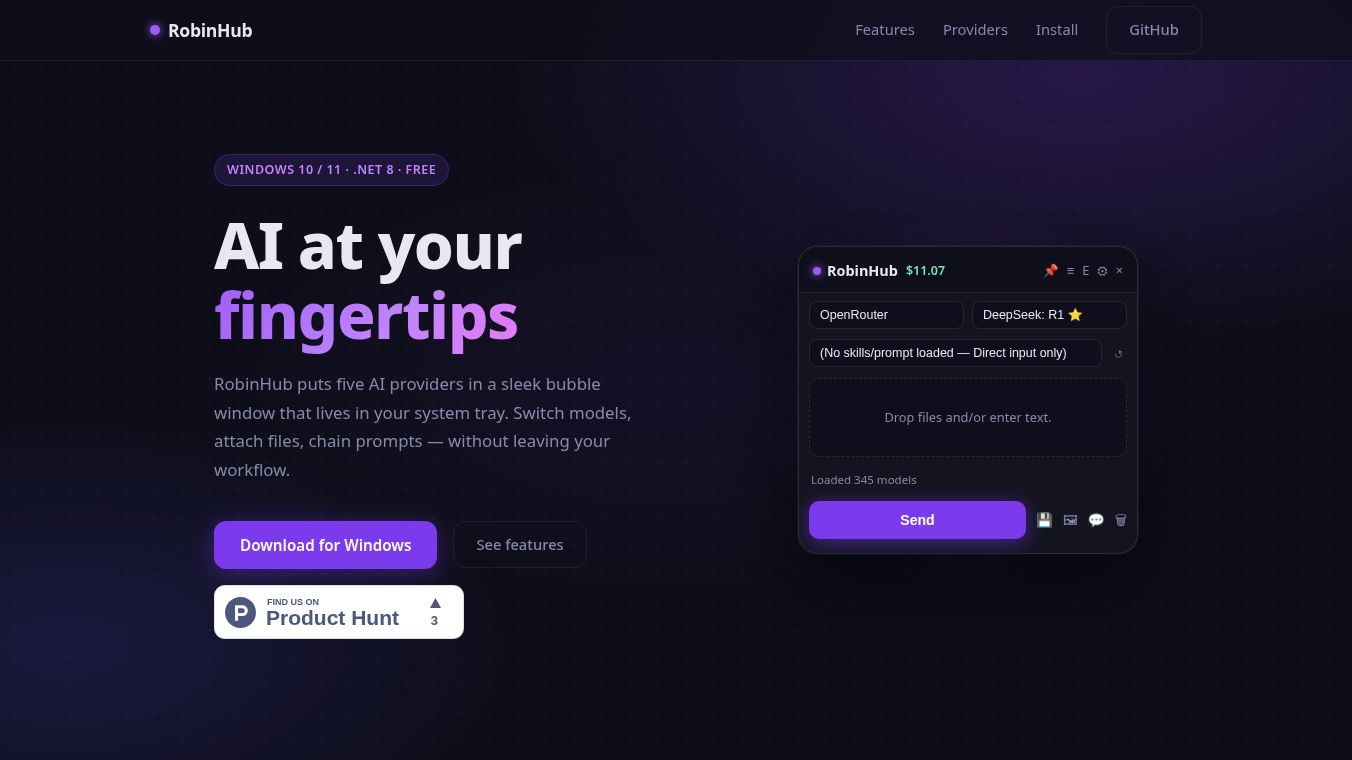





RobinHub is a free software tool built for Windows 10 and 11 computers. It acts as a local AI assistant that brings together five different AI services into one simple window. This tool is designed for developers, writers, and researchers who want to use advanced artificial intelligence without having to manage multiple browser tabs or complicated setups. The application stays hidden in the system tray until the user needs it, allowing for a clean and focused workspace.
Benefits
RobinHub offers several key advantages for users who need powerful AI tools. First, it connects to over 345 different AI models from five major providers including OpenRouter, OpenAI, Anthropic, Google Gemini, and local options like Ollama. This means users can switch between models instantly without leaving the application. The interface is designed to be unobtrusive with a frameless window that uses glassmorphism effects and can be resized to fit any screen. Security is a major focus as all API keys are encrypted using Windows DPAPI and users can add a master password for extra protection. The tool also supports file uploads and URL fetching so users can analyze documents or web pages directly within the chat. Finally, every conversation is automatically saved with a custom naming pattern so users can easily find past discussions later.
Use Cases
This tool is perfect for people who need to write code, draft articles, or conduct research. Writers can use it to generate ideas or expand on their thoughts by dragging in documents or pasting links. Developers can test different AI models to see which one works best for their specific coding tasks. Researchers can upload PDFs or browse websites to get summaries and answers from the AI. Because the application runs locally and supports local models, it works well even when internet access is limited or when privacy is a top concern. The keyboard shortcuts allow power users to summon the window and send commands quickly without using a mouse.
Pricing (ONLY include if available)
RobinHub is completely free to download and use. It is available for Windows 10 and Windows 11 systems. The application is built using the .NET 8 framework. Although a price of 11.07 dollars was listed in some sources, the official description clearly states that the software is free of charge.
Vibes (ONLY include if available)
There are no specific user reviews or testimonials available in the provided information about RobinHub. The description focuses on the technical features and capabilities rather than public feedback from the community.
Additional Information (ONLY include if available)
The project is hosted on GitHub by a user named dayeggpi. The application requires a Windows operating system to run. Users can configure the tool by clicking a gear icon to enable providers and paste their API keys. The setup process is designed to be very fast, with users expected to be fully operational within about 60 seconds after installation. The application supports both image and video generation capabilities depending on the selected model.
This content is either user submitted or generated using AI technology (including, but not limited to, Google Gemini API, Llama, Grok, and Mistral), based on automated research and analysis of public data sources from search engines like DuckDuckGo, Google Search, and SearXNG, and directly from the tool's own website and with minimal to no human editing/review. THEJO AI is not affiliated with or endorsed by the AI tools or services mentioned. This is provided for informational and reference purposes only, is not an endorsement or official advice, and may contain inaccuracies or biases. Please verify details with original sources.



Comments
Please log in to post a comment.