QuickFeed





What is QuickFeed
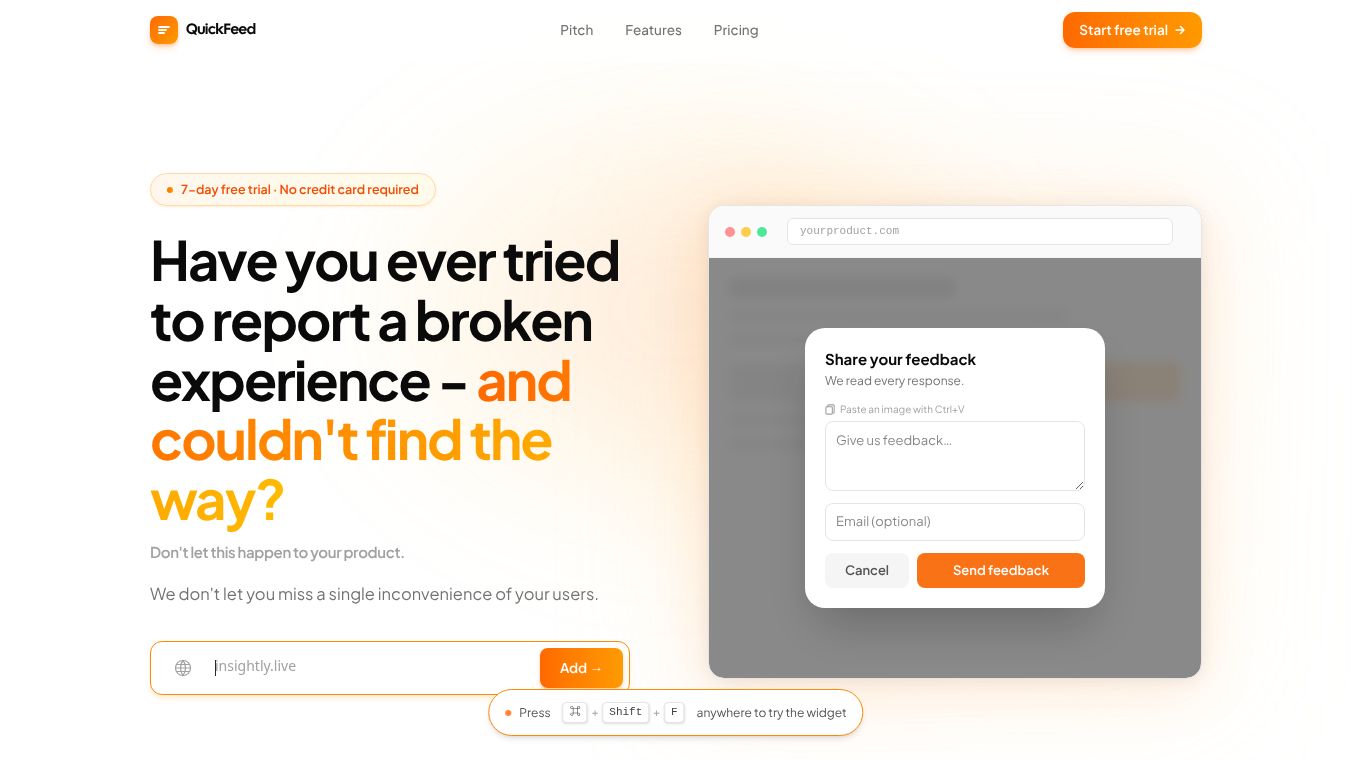
QuickFeed is a tool designed to help creators and businesses manage their social media content more efficiently. It acts as a central hub where users can organize, schedule, and publish posts across multiple platforms like Instagram, TikTok, and YouTube. The main goal of QuickFeed is to simplify the process of content creation so that users can focus on making great content instead of worrying about the logistics of posting it online.
Benefits
One of the biggest advantages of QuickFeed is its ability to save time. By allowing users to schedule posts in advance, it ensures that content is always ready to go without needing constant manual updates. This feature is especially helpful for teams that need to maintain a consistent online presence without working around the clock.
Another key benefit is its user-friendly interface. The platform is built to be easy to navigate, making it accessible for people who may not have technical expertise. Users can drag and drop images or videos into their content calendar, which makes organizing posts feel intuitive and straightforward.
QuickFeed also offers collaboration tools that allow team members to work together on content. Multiple users can access the same account, leave comments, and approve posts before they go live. This feature helps ensure that everyone on the team is on the same page and that content meets quality standards before it reaches the audience.
Use Cases
QuickFeed is ideal for social media managers who handle accounts for brands or influencers. These professionals often juggle multiple platforms and need a reliable way to keep their schedules on track. With QuickFeed, they can plan weeks or even months of content in advance, reducing the stress of last-minute posting.
Small business owners can also benefit from this tool. Many small businesses struggle to find the time to manage their social media alongside running their day-to-day operations. QuickFeed allows them to set up a posting schedule once and let the system handle the rest, freeing up time to focus on other important tasks.
Content creators who post frequently on platforms like TikTok or Instagram can use QuickFeed to maintain consistency. Consistent posting is key to growing an audience, and this tool helps creators stay on top of their game without burning out.
Pricing
QuickFeed offers different pricing plans to suit various needs. There is a free tier that provides basic features for individuals who just want to get started. For teams or businesses that need more advanced capabilities, there are paid plans available. These plans typically include additional storage, more scheduling options, and enhanced collaboration tools. Specific pricing details may vary, so users are encouraged to check the official website for the most current rates.
Vibes
Users who have tried QuickFeed often praise its simplicity and reliability. Many reviews highlight how much easier it has made their workflow, especially when managing multiple social media accounts. Some users mention that the drag-and-drop feature is a game-changer, as it eliminates the frustration of dealing with complicated interfaces.
While some users note that the free version has limitations, they generally agree that the paid plans offer excellent value for the features provided. Overall, the community feedback suggests that QuickFeed is a solid choice for anyone looking to streamline their social media management process.
Additional Information
QuickFeed has gained attention in the creator economy space for its focus on empowering independent creators and small businesses. It has partnered with several social media platforms to ensure seamless integration and compatibility. These partnerships help the tool stay up to date with the latest features and changes on major social media networks.
The platform continues to evolve based on user feedback, with regular updates that introduce new features and improvements. This commitment to listening to its users has helped QuickFeed build a loyal following among creators and businesses alike.
This content is either user submitted or generated using AI technology (including, but not limited to, Google Gemini API, Llama, Grok, and Mistral), based on automated research and analysis of public data sources from search engines like DuckDuckGo, Google Search, and SearXNG, and directly from the tool's own website and with minimal to no human editing/review. THEJO AI is not affiliated with or endorsed by the AI tools or services mentioned. This is provided for informational and reference purposes only, is not an endorsement or official advice, and may contain inaccuracies or biases. Please verify details with original sources.



Comments
Please log in to post a comment.