OLVA.ai
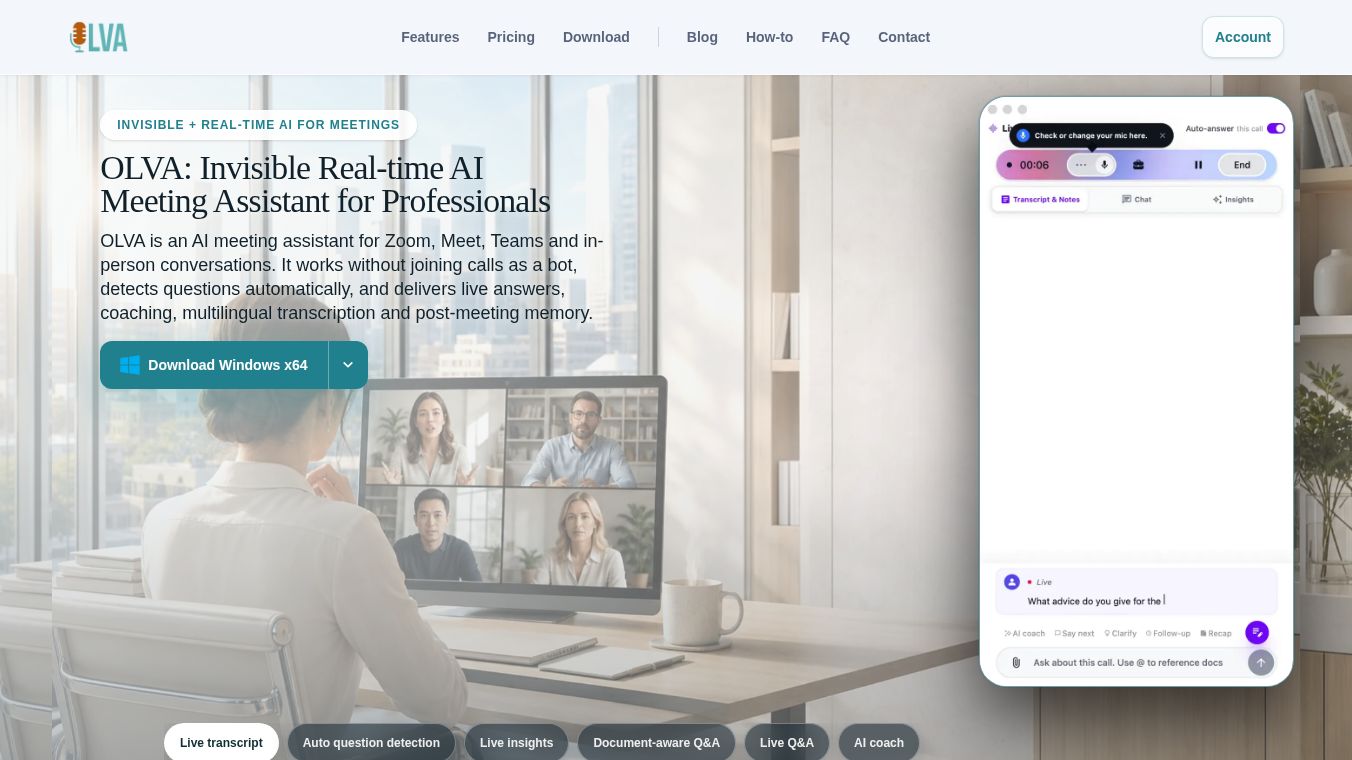





OLVA: Invisible Real-Time AI Meeting Assistant for Professionals
Research context and background
OLVA is an artificial intelligence tool designed to help people during meetings. Unlike other assistants that join calls as visible bots, OLVA works as a private companion. It runs on your device and listens to the audio without showing up on the screen. This means it does not disrupt the flow of conversation or change how participants feel about privacy. OLVA is built for Zoom, Google Meet, Microsoft Teams, Slack, Webex, and even in-person conversations when used with a mobile app.
Benefits
OLVA offers several key advantages that make it stand out from other meeting tools. First, it provides live transcription in 87 different languages. Users can switch between languages or use auto-detection to ensure everyone is understood. Second, the tool automatically detects questions asked during the meeting. It then generates confident answers instantly using the context of the conversation. This saves time and keeps the discussion moving. Third, OLVA acts as an AI coach. It gives real-time insights, suggests follow-up questions, and highlights risks or important signals while the meeting is happening. Finally, it supports document-aware chat. Users can reference contracts, briefs, or notes during the call to enhance their responses. All paid plans include these live features, ensuring users get help exactly when they need it.
Use Cases
OLVA is useful for a wide range of professional situations. It works well for global teams that need to communicate in multiple languages. The multilingual support allows a manager in one country to understand a team member in another without translation delays. It is also ideal for high-stakes meetings where quick answers are needed. For example, a salesperson can ask about a contract clause during a negotiation and get an immediate summary. The mobile companion app makes it perfect for in-person meetings. Users can record conversations, follow transcripts in real time, and ask for help on the go. After the meeting, users can review recaps and history without needing a desktop computer. This flexibility makes it suitable for remote workers, hybrid teams, and executives who value privacy and efficiency.
Pricing
OLVA offers clear pricing options that include live AI features in every plan. The Basic plan is free for a trial and includes 3 hours of total meeting time. It also provides real-time insights, live transcription, and auto question detection. The Plus plan costs $12.50 per month or $150 per year. This tier adds 50 hours of meeting time per month. The Pro plan costs $25 per month or $300 per year and offers unlimited meeting time. For larger organizations, OLVA provides tailored Teams and Enterprise plans. These include advanced security, audit logs, custom integrations, and dedicated account managers. All plans retain the core live context workflow, so users always have access to transcription and coaching.
Vibes
Public reception highlights OLVA as a unique solution for the live meeting moment. Users appreciate that it does not join calls as a bot, which preserves consent and privacy protocols. Reviews often mention how helpful the live coaching is for navigating complex conversations. The ability to get answers instantly without stopping the meeting is a frequent point of praise. Many professionals feel it is less intrusive than traditional notetakers that focus only on post-meeting notes. The mobile app receives positive feedback for its ability to handle in-person conversations seamlessly. Overall, the tool is seen as a practical assistant that enhances productivity without getting in the way.
Additional Information
OLVA distinguishes itself from competitors like Granola, Fireflies.ai, Fathom, and Otter.ai by focusing on live help rather than just post-meeting notes. It is the only tool in its category that offers full parity on both iOS and Android for in-person support. The company emphasizes privacy by default, ensuring that users maintain normal consent practices required by their meetings. This approach sets a new standard for how AI assistants interact with professional conversations.
This content is either user submitted or generated using AI technology (including, but not limited to, Google Gemini API, Llama, Grok, and Mistral), based on automated research and analysis of public data sources from search engines like DuckDuckGo, Google Search, and SearXNG, and directly from the tool's own website and with minimal to no human editing/review. THEJO AI is not affiliated with or endorsed by the AI tools or services mentioned. This is provided for informational and reference purposes only, is not an endorsement or official advice, and may contain inaccuracies or biases. Please verify details with original sources.




Comments
Please log in to post a comment.