Notta Desktop - Privacy Mode
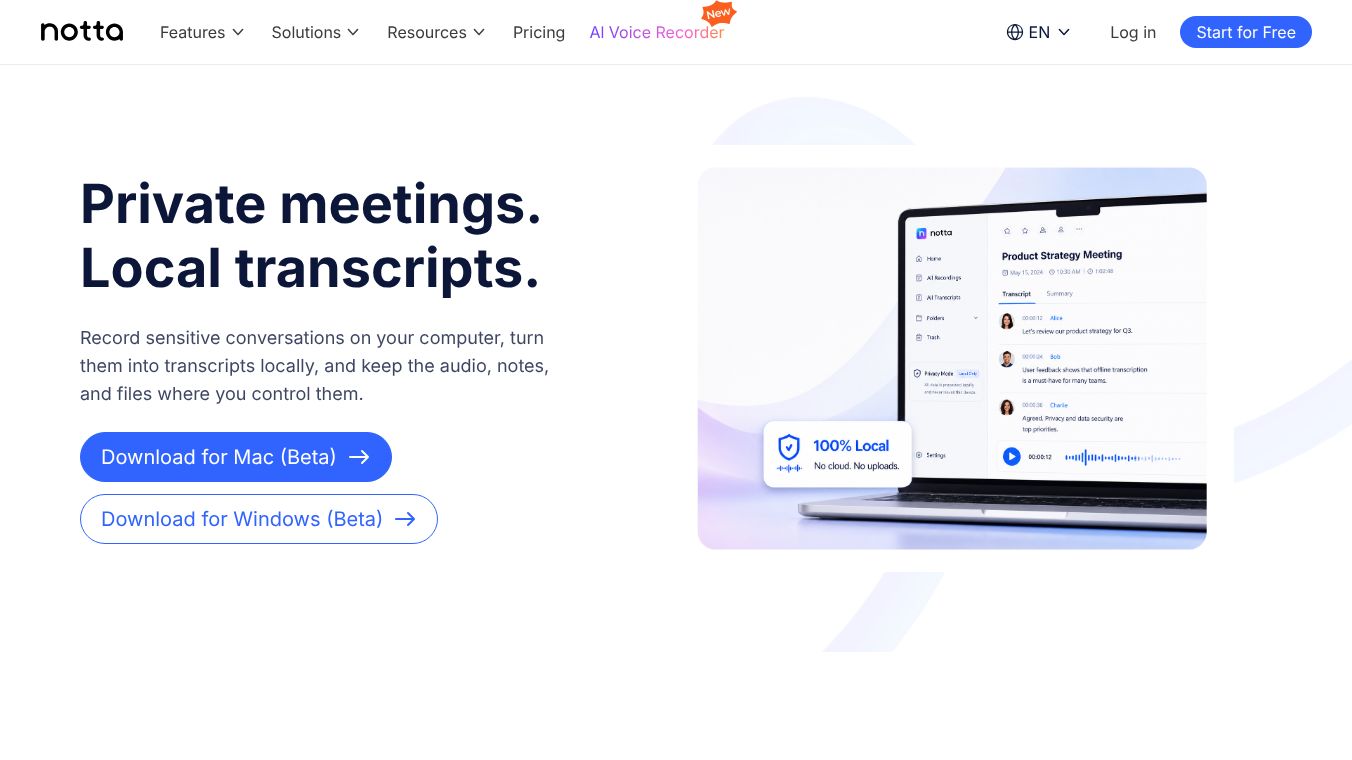





Notta Desktop Privacy Mode: Secure, Local Transcription for Sensitive Conversations
Overview
Notta Desktop Privacy Mode is a specialized feature designed to record and transcribe sensitive conversations entirely on your local computer. Unlike standard cloud-based workflows, Privacy Mode ensures that meeting audio, transcripts, notes, and related files never leave your device for cloud processing. This mode is ideal for users who require strict data privacy, adhere to company policies restricting cloud uploads, or need to process long-form content without cloud minute limits.
Benefits
Notta Desktop Privacy Mode offers several key advantages for users who prioritize security and control.
- Local Transcription Without Cloud Processing: In this mode, the transcription process happens directly on your computer. Audio files do not need to be uploaded to Notta's cloud servers. This is critical for protecting confidential client calls, legal reviews, or internal strategy discussions.
- Complete Data Control: All data generated during a session remains under your control. Recordings, transcripts, folders, and related data are stored in a local folder on your computer. This ensures that private meeting data is not mixed with cloud-based workspaces.
- Unlimited Local Transcription: Privacy Mode removes the constraints of cloud transcription limits. Users can transcribe long meetings, interviews, workshops, and review sessions without consuming cloud transcription minutes. While there are no software-imposed minute limits, practical limits exist based on your computer's memory, CPU, and available storage space.
- Offline Functionality: Once the initial setup is complete, Privacy Mode can operate without an internet connection. The core transcription function works offline, though an internet connection may still be required for initial login, app updates, or switching between cloud and privacy workflows.
Use Cases
Privacy Mode is specifically designed for scenarios where data sovereignty and privacy are paramount.
- Legal and Finance Reviews: This mode is perfect for keeping contract reviews, pricing discussions, audits, and case updates local while maintaining searchable transcripts.
- Research Interviews: Researchers can record interviews locally before quotes, notes, or raw data are cleaned, coded, or shared.
- Restricted Environments: Teams with policies limiting external meeting bots, cloud recorders, or cloud transcription tools can use this feature to stay compliant.
Pricing
Pricing details for Notta Desktop Privacy Mode are not available in the provided information.
Vibes
Public reception, reviews, or testimonials regarding Notta Desktop Privacy Mode are not available in the provided information.
Additional Information
Notta Desktop Privacy Mode supports transcription via two local models, with language support varying by model.
- Local Transcription Model: This model supports auto-language detection and works with Simplified Chinese, English, Japanese, Korean, and Cantonese.
- Apple Speech Analyzer: This model is recommended for macOS users due to higher speed and accuracy. It supports Simplified Chinese, English, Japanese, Korean, German, French, Spanish, Italian, Portuguese, Cantonese, and Traditional Chinese. When using Apple Speech Analyzer for file transcription, users must select a specific language rather than relying on auto-detection.
Transcription accuracy in Privacy Mode depends on the chosen local model, language, audio quality, speaker accent, background noise, and vocabulary. The Apple Speech Analyzer is generally recommended when available, as it is faster and more accurate than the default Local Transcription Model. Benchmarks suggest word error rates around 4% to 7% for clean speech in major languages.
To use this feature, users need a computer with at least 4 GB of RAM, a CPU with a minimum of 2 cores, and a local storage directory that is writable. If available space drops below 500 MB, Privacy Mode may fail. If space drops below 1 GB, a storage warning is displayed.
To enable Privacy Mode, users must download Notta Desktop, sign in to their account, switch from Cloud Mode to Privacy Mode in the top-left corner, download the offline ASR Engine if prompted, and then begin recording or transcribing locally.
This content is either user submitted or generated using AI technology (including, but not limited to, Google Gemini API, Llama, Grok, and Mistral), based on automated research and analysis of public data sources from search engines like DuckDuckGo, Google Search, and SearXNG, and directly from the tool's own website and with minimal to no human editing/review. THEJO AI is not affiliated with or endorsed by the AI tools or services mentioned. This is provided for informational and reference purposes only, is not an endorsement or official advice, and may contain inaccuracies or biases. Please verify details with original sources.



 No Info
Comments
Please log in to post a comment.