Molten Mail
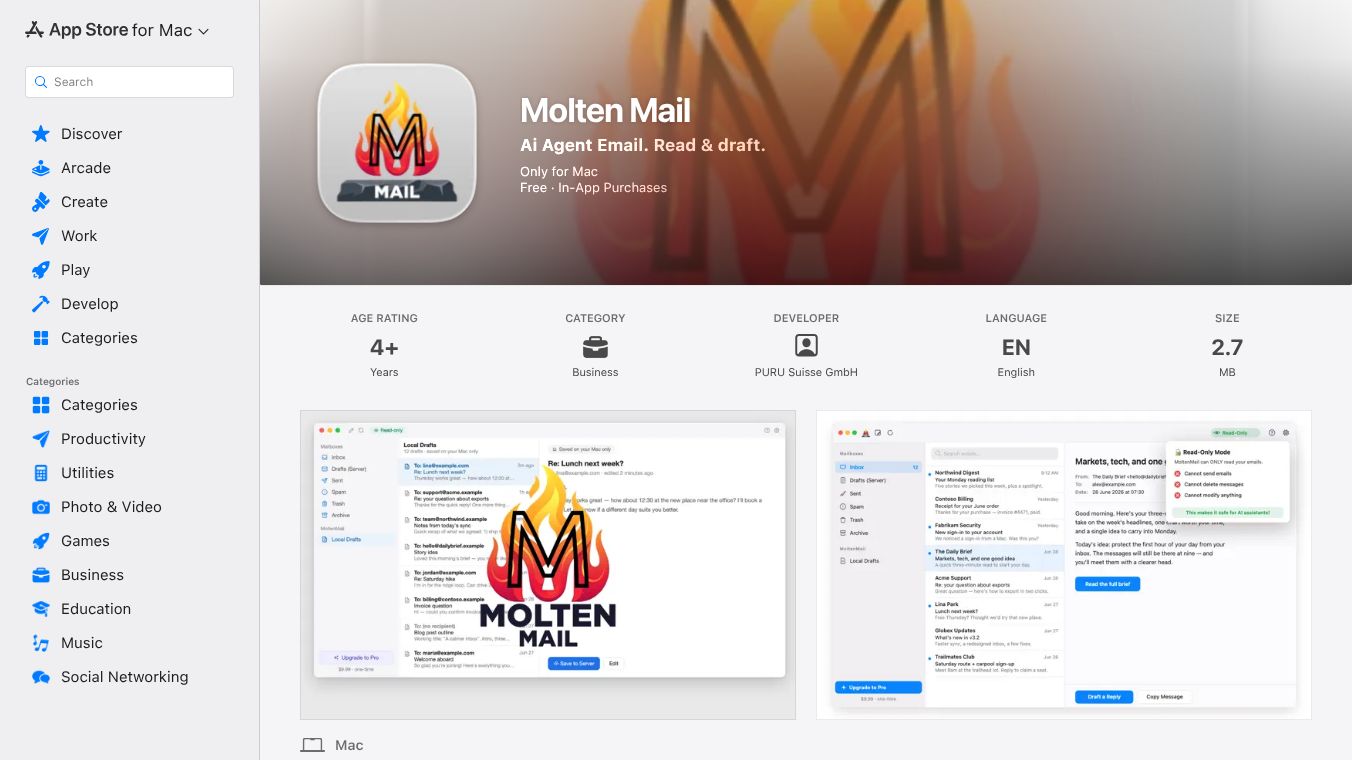





MoltenMail: Your Private Email Assistant for the AI Era
Introduction
MoltenMail is a private email application built for the age of artificial intelligence. It runs entirely on your Mac and lets you connect a local AI assistant to your email inbox. The tool helps you read messages and create draft replies without ever sending your data to the cloud. A core rule of MoltenMail is that nothing is sent, deleted, or moved unless you explicitly do so yourself. The AI can only read messages and create drafts; it cannot send, delete, move, or mark emails. Your email password stays safe in your Mac's Keychain and is never exposed to the AI assistant.
Benefits
MoltenMail offers several key advantages for users who want to use AI with their email safely.
- Local-First Privacy:Your mail stays on your Mac. There is no cloud relay or hosted email by MoltenMail. The AI assistant connects via a private connection on your computer only.
- Granular Control:You choose what is allowed via a master switch and separate toggles for "Read mail" and "Create drafts" in the Local Agent Access settings. These can be turned off at any time.
- Security:Your email password remains secure in your Mac's Keychain within MoltenMail and is never exposed to the AI assistant. The assistant sees the message text MoltenMail chooses to expose. Attachments and remote images are not passed through by default.
- Compatibility:Works with OpenClaw, Hermes, Claude Desktop, Claude Code, Cursor, Codex, LM Studio, and more.
- Reversibility:You can turn agent access off instantly using the switch in MoltenMail Settings.
Use Cases
MoltenMail is designed for anyone who wants to use AI to help manage their email while keeping their data private.
- Drafting Replies:You can ask your AI assistant to read an incoming email and write a draft response for your review. The AI cannot send the email until you approve it.
- AI-Powered Workflows:Developers and power users can connect MoltenMail to coding agents like Cursor or Claude Code to automate email tasks within their development environment.
- Local AI Integration:Users running local AI models on their Mac can use MoltenMail to give their AI access to their email inbox without relying on internet-connected services.
- Secure Email Management:Professionals who handle sensitive information can use MoltenMail to ensure their email data never leaves their device.
Pricing
MoltenMail offers a free version and a paid Pro version.
- Free Version:Includes everything with an allowance of server-saved drafts. This means you can use the AI to read mail and create drafts, but there is a daily limit on how many drafts can be saved directly to your mail server.
- MoltenMail Pro:Removes the daily cap, allowing every reply your assistant drafts to be saved straight to your mail server unlimited. It is a one-time purchase with no subscription. You can use it on up to 5 Macs. Checkout is handled securely by Stripe and Swiss licensing partner PURU Suisse GmbH.
Vibes
MoltenMail has received positive feedback from users who value privacy and local-first software. The app is designed to be simple and secure, with a focus on giving users full control over their data. Users appreciate the ability to connect their favorite AI tools without worrying about their email being sent to a third-party cloud server. The community has noted that the manual setup for the App Store version can be a bit technical, but the direct download version offers a faster and easier experience. Overall, the tool is seen as a reliable option for those who want to integrate AI into their email workflow without compromising on security.
Additional Information
MoltenMail is developed by MoltenRock. The software is available as a direct download from moltenrock.com or via the Mac App Store. The direct download version is recommended for the fastest setup as it bundles the helper inside the main application. The App Store version requires a small, separate free helper file to be downloaded and configured manually due to Apple sandbox rules. The company uses MCP (Model Context Protocol) to allow AI apps to use tools safely. Support is available via email for users who encounter issues with their macOS version or specific AI app they are connecting.
This content is either user submitted or generated using AI technology (including, but not limited to, Google Gemini API, Llama, Grok, and Mistral), based on automated research and analysis of public data sources from search engines like DuckDuckGo, Google Search, and SearXNG, and directly from the tool's own website and with minimal to no human editing/review. THEJO AI is not affiliated with or endorsed by the AI tools or services mentioned. This is provided for informational and reference purposes only, is not an endorsement or official advice, and may contain inaccuracies or biases. Please verify details with original sources.




Comments
Please log in to post a comment.