Merlin AI Code Review
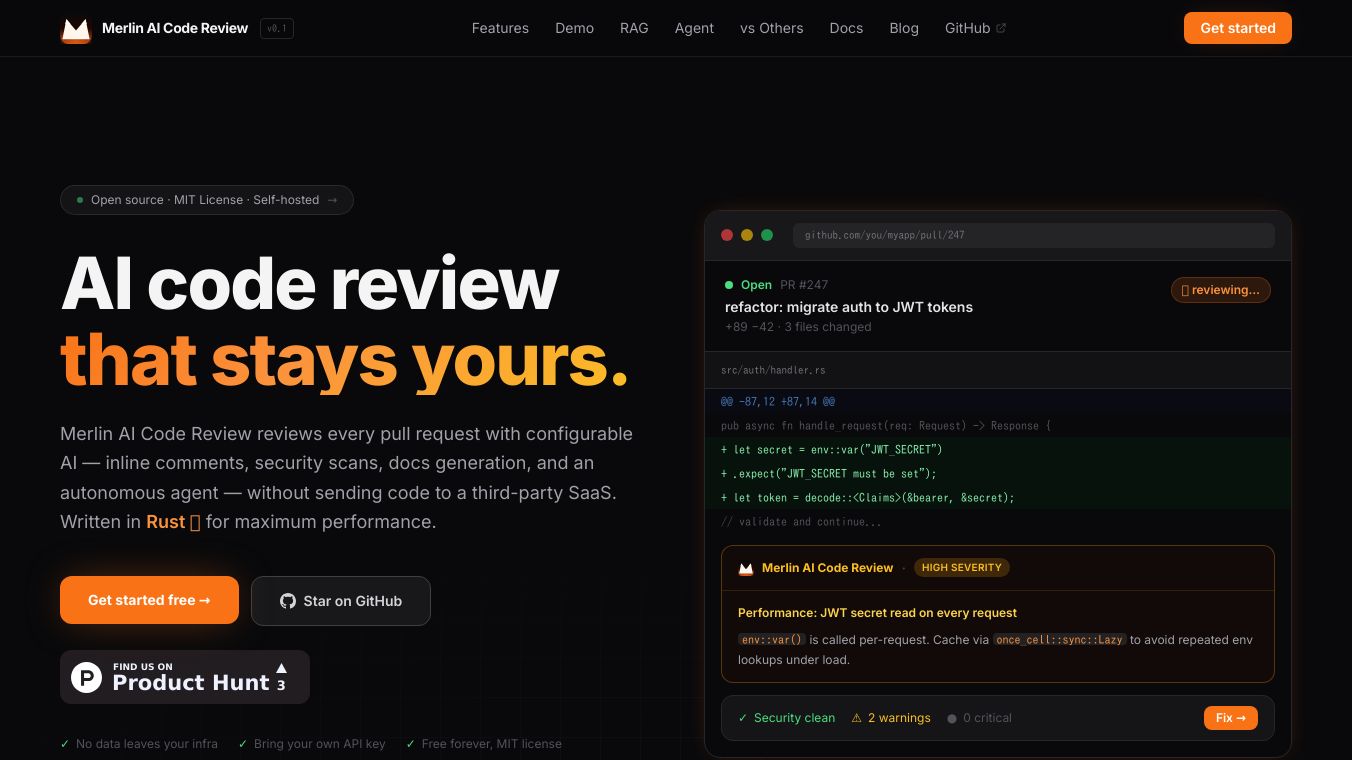





Merlin AI Code Review is a tool that helps developers improve their code quality by using artificial intelligence. It works by analyzing code changes in pull requests and providing feedback directly within platforms like GitHub, GitLab, and Bitbucket. A key benefit is that Merlin runs within your own infrastructure, meaning your code never leaves your systems, which is great for security and privacy.
Benefits
Merlin offers several advantages for development teams. It supports a wide variety of AI providers, giving you flexibility in choosing the best AI for your needs. The tool integrates smoothly with popular version control systems, automatically detecting them from your CI environment. It also provides over 20 helpful slash commands that can be used to perform tasks like full code reviews, generating documentation, or creating tests. Merlin can even index your entire codebase to give AI reviewers better context, leading to more accurate feedback. For security, it can rank files by sensitivity and scan for common vulnerabilities and secrets. There's also a feature that allows a second AI pass to refine the feedback and remove any incorrect suggestions. If you need to work offline, Merlin has a local mode for testing.
Use Cases
This tool is designed for software development teams using platforms such as GitHub, GitLab, Bitbucket, Azure DevOps, and Gitea. It's particularly useful for automating code reviews within the CI CD pipeline. Developers can use the slash commands to quickly get AI assistance on specific tasks within a pull request. The security scanning feature makes it valuable for projects that handle sensitive data. Teams can also use Merlin to generate documentation or tests automatically, saving time and effort.
Vibes
Merlin is designed to be flexible, allowing users to easily switch between different AI providers, vector stores, or version control platforms by changing just one configuration setting. This means you are not locked into any specific technology.
Additional Information
Merlin can be installed easily using a one-line installer for Linux and macOS, PowerShell for Windows, a Docker image, or by building it from source. The setup process for platforms like GitHub involves adding API keys as repository secrets and creating a workflow file. Merlin uses the built-in CI tokens from these platforms to post comments as a bot, making the review process seamless. For more advanced use, Merlin can run as a persistent server to listen for events or even act as an autonomous agent that plans and executes tasks.
This content is either user submitted or generated using AI technology (including, but not limited to, Google Gemini API, Llama, Grok, and Mistral), based on automated research and analysis of public data sources from search engines like DuckDuckGo, Google Search, and SearXNG, and directly from the tool's own website and with minimal to no human editing/review. THEJO AI is not affiliated with or endorsed by the AI tools or services mentioned. This is provided for informational and reference purposes only, is not an endorsement or official advice, and may contain inaccuracies or biases. Please verify details with original sources.

 No Info



Comments
Please log in to post a comment.