Image Editor
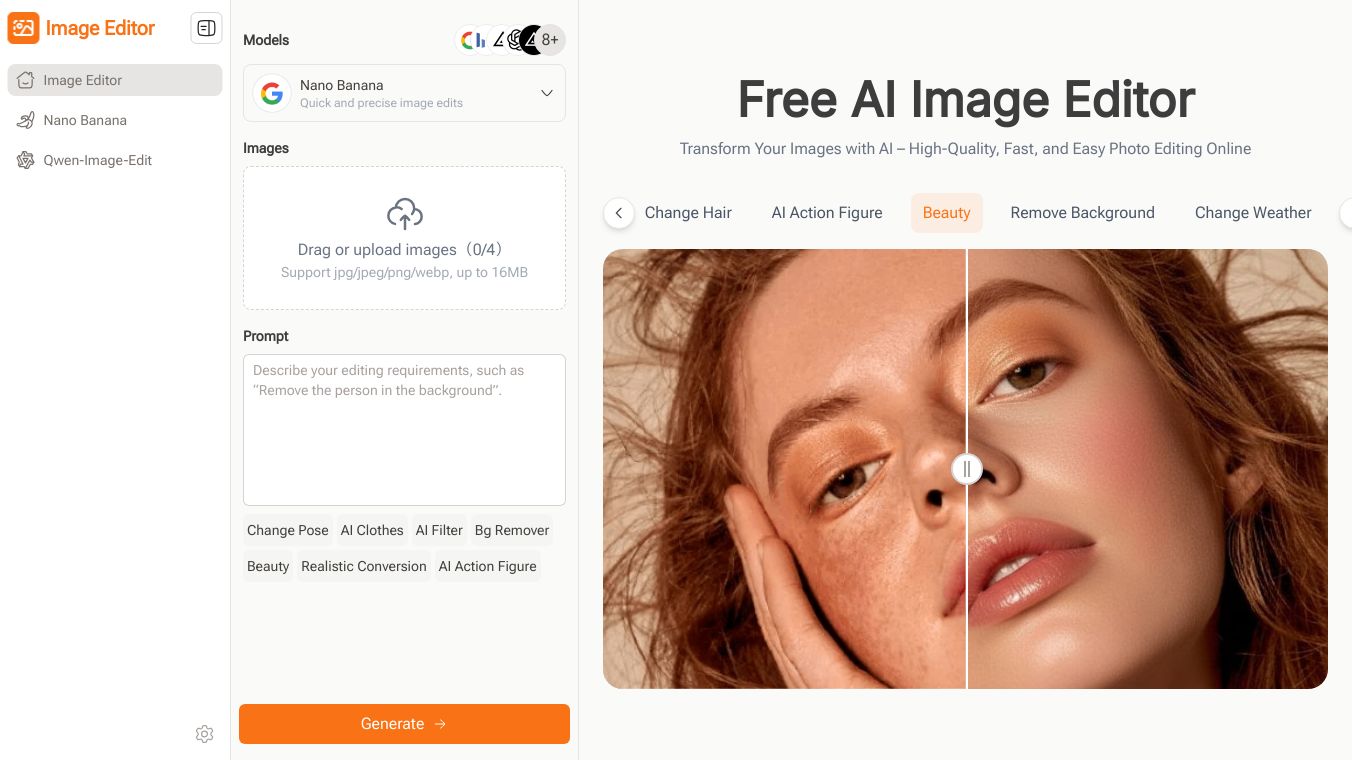





What is Image Editor?
Image Editor is an AI-powered online tool that simplifies photo editing. It helps users enhance, edit, and transform images quickly. With features like background removal, pose adjustment, AI clothes, and style transfer, it is perfect for portraits, products, and creative projects. Image Editor allows users to edit photos using natural language prompts, making it accessible to everyone, regardless of their editing skills.
Benefits
Image Editor offers several key advantages:
- Zero Learning Curve: Edit images effortlessly using simple text prompts. Describe what you want, and the AI handles the editing automatically. No design skills or complex software are needed.
- Multiple AI Models: Choose from AI models like Nano Banana, Flux Kontext, Seedream, and GPT, each designed to enhance photos differently. Quickly handle tasks like background removal or style transformation with ease.
- Pre-Designed Prompts and Styles: Even if you don’t know how to write prompts, you can click and apply ready-made templates, prompts, and styles. This saves time and inspires creativity while producing professional-looking results.
- Continuous Editing: Edit images repeatedly in one place until you are satisfied. This continuous workflow allows users to refine every detail and experiment with multiple styles without switching between tools.
- High-Quality Free Downloads: Download your creations in high resolution for free. Whether it’s a photo, poster, or social media content, users get professional-quality images without any cost.
- Supports Multiple Scenarios: From photo optimization to creating social media posts, posters, or learning materials, Image Editor adapts to various use cases. It’s a versatile tool for content creators, educators, and marketers alike.
Use Cases
Image Editor is useful in various scenarios:
- Content Creation: Bloggers and social media managers can enhance photos, remove backgrounds, and create polished visuals quickly.
- Marketing: Marketing managers can produce professional visuals for campaigns, banners, and promotional graphics efficiently.
- Education: Teachers can enhance photos, create diagrams, and design learning visuals effortlessly, making educational content more engaging.
- E-commerce: Product managers can remove backgrounds, enhance product details, and generate consistent, professional images quickly for online stores and social media channels.
- Design: Designers can create posters and social media visuals with creative, high-quality images in minutes.
Vibes
Here’s what users are saying about Image Editor:
- J. Smith, Content Creator: "Image Editor has completely changed how I work with images. Using AI models and preset prompts, I can enhance photos, remove backgrounds, and create polished visuals quickly. It saves me hours compared to traditional editing software, letting me produce high-quality content for blogs, social media, and presentations effortlessly."
- L. Brown, Marketing Manager: "As a marketing manager, I rely on Image Editor to produce professional visuals for campaigns. The AI-powered models and hundreds of preset prompts allow me to create banners, social media posts, and promotional graphics efficiently. It’s fast, intuitive, and helps me maintain high-quality results without advanced software or technical skills."
- M. Lee, Blogger: "Image Editor helps me manage my blog visuals efficiently. Using AI models and preset prompts, I can adjust colors, polish photos, and apply filters quickly. The results are professional every time, saving hours of editing and maintaining a consistent, visually appealing style across all posts without complex software."
- A. Patel, Teacher: "For teaching materials, Image Editor is perfect. I can enhance photos, create diagrams, and design learning visuals effortlessly. Its AI prompts simplify complicated edits, allowing me to produce high-quality educational content quickly. Students enjoy clearer, more engaging materials, and I save a lot of time compared to traditional editing tools."
- R. Gomez, Product Manager: "Image Editor is essential for my online store. I can remove backgrounds, enhance product details, and generate consistent, professional images quickly. The AI models and preset prompts save time and effort, making product photos look polished for my e-commerce site and social media channels without needing Photoshop or advanced editing skills."
- S. Carter, Designer: "I use Image Editor to create posters and social media visuals. The AI-powered models and hundreds of prompts let me produce creative, high-quality images in minutes. It’s fast, easy to use, and delivers professional results without complicated software, helping me stand out and maintain consistent visual quality across all my projects."
Additional Information
Image Editor is designed to be simple and intuitive. Users can describe their needs with natural language or select preset prompts. The AI models handle the editing automatically, allowing even beginners to generate high-quality visuals for social media, posters, or learning materials without learning complex software like Photoshop. Image Editor supports multiple AI models, including Nano Banana, Flux Kontext, Seedream, and GPT. Each model has unique strengths, allowing users to enhance photos, apply creative filters, remove backgrounds, or generate style references. This flexibility ensures that Image Editor can handle various tasks efficiently for different projects. Image Editor offers free access to its core features. Users can edit images, apply AI prompts, and download high-quality results without payment. While some advanced features or high-resolution options may be limited in the free version, the tool provides enough functionality for most social media, blog, or learning content projects. Image Editor uses AI to process images quickly. Depending on image complexity, it can take a few seconds to under a minute to enhance, apply filters, or remove backgrounds. This speed allows users to handle multiple images efficiently, making it suitable for social media posts, e-commerce listings, or any scenario where high-quality visuals are needed quickly. Image Editor allows you to merge multiple images into one for editing. Simply upload several photos and choose an AI prompt or preset template. The AI intelligently blends all images while enhancing colors, lighting, and details. This makes it fast and easy to create collages, social media banners, or creative posters, maintaining a consistent style and producing high-quality results. Image Editor includes AI models that can apply style transfer, filters, and various creative effects. Users can choose from hundreds of preset prompts or describe their own vision. The AI then transforms images, producing professional-quality visuals suitable for social media, posters, or personal projects. Image Editor allows users to download high-quality, high-resolution images. The AI enhancement ensures that details are sharp and clear. This feature is particularly useful for content creators, marketers, and educators who need professional-quality visuals for blogs, presentations, or printed materials. Image Editor works well for educational purposes. Users can enhance diagrams, create visuals, or edit photos for study materials. The AI-powered tool simplifies complex edits, allowing teachers, students, and educators to produce high-quality images quickly, making learning materials more engaging and visually appealing. No installation is required. Image Editor is fully online and works in a web browser. Users can access AI models, apply preset prompts, and download images without downloading software or plugins. This makes it convenient for any device and eliminates compatibility issues, ensuring a smooth editing experience. Image Editor is ideal for e-commerce. Users can remove backgrounds, enhance product details, and create clean, professional images for listings. AI models allow for consistent style and high-quality results, making it easier for sellers to produce appealing visuals for online stores or social media marketing. Choosing the right AI model depends on your editing needs. For detail enhancement, Nano Banana works well; for creative effects, Flux Kontext or Seedream are ideal. GPT can assist with style references. Image Editor allows you to preview results, making it simple to select the model that delivers the best output for your project.
This content is either user submitted or generated using AI technology (including, but not limited to, Google Gemini API, Llama, Grok, and Mistral), based on automated research and analysis of public data sources from search engines like DuckDuckGo, Google Search, and SearXNG, and directly from the tool's own website and with minimal to no human editing/review. THEJO AI is not affiliated with or endorsed by the AI tools or services mentioned. This is provided for informational and reference purposes only, is not an endorsement or official advice, and may contain inaccuracies or biases. Please verify details with original sources.



 No Info

Comments
Please log in to post a comment.