docktor





docktor: The Dock You Deserve
Research context and background
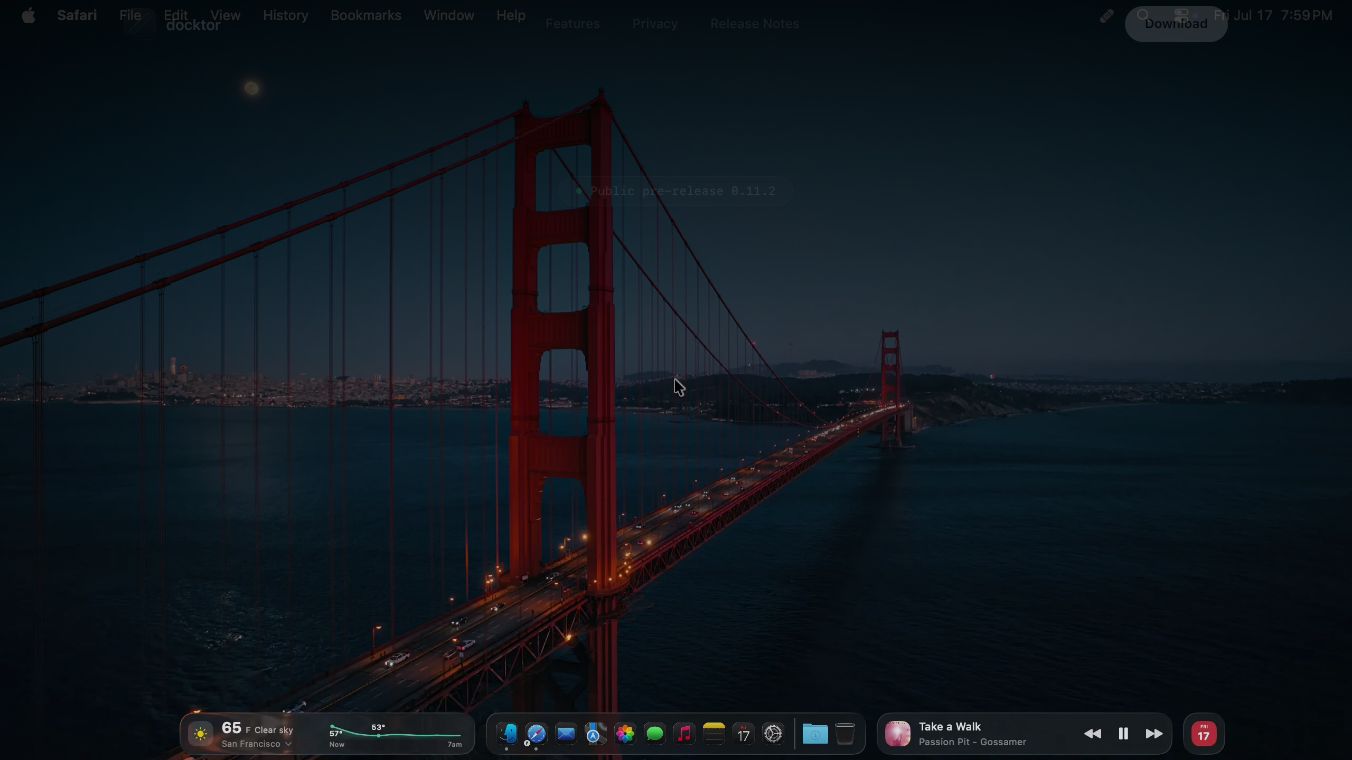
docktor is a free application for Mac computers that changes how users interact with their Dock. It turns the Dock into a dynamic control surface that shows live previews of open windows and provides quick access to music, calendar events, weather, and system stats. The app works without requiring an account and is designed to enhance the existing macOS experience rather than replace it.
Benefits
The main advantage of docktor is that it makes switching between windows faster and more visual. Instead of using the standard keyboard shortcut to switch apps, users can hover over an icon to see a live thumbnail of every open window. This helps them pick the right window on the first try without opening the full Mission Control screen. The app also includes built-in widgets for music control, calendar events, weather updates, and system performance monitoring. These features are all accessible directly from the Dock area, saving time and keeping essential information at a glance. The app prioritizes privacy by keeping data local on the user's computer and not requiring an account for core features.
Use Cases
docktor is ideal for users who manage many windows and apps on their Mac. It is especially useful for people who want to see exactly which window is open before switching to it. The live preview feature helps users avoid accidentally opening the wrong document or tab. The built-in music widget allows users to control their Spotify or Apple Music playback without leaving their current task. The calendar widget helps users stay on top of upcoming meetings by showing a live countdown to the next event. The weather widget provides quick updates on temperature and conditions for saved locations. The system stats feature lets users monitor CPU and memory usage without opening the Activity Monitor app. This tool works well for anyone who wants a cleaner, more efficient workflow on their Mac.
Pricing
docktor is completely free to use. It is available as a public pre-release application, meaning users can download and install it immediately without any cost. The app is a universal binary, so it works on various Mac configurations.
Vibes
As a public pre-release tool, docktor has not yet received widespread public reviews or testimonials. However, the developers have focused on stability and user experience in recent updates. The latest version includes fixes for issues with Dock magnification and gaps when the Dock is positioned on the side of the screen. Users are advised to read the full changelog before installing to stay informed about new features and fixes. The app is designed to be lightweight and non-intrusive, fitting seamlessly into the existing macOS environment.
Additional Information
docktor is currently in a public pre-release phase. It requires macOS 26.0 or later to run. The app uses specific permissions to function correctly, such as screen recording for live window previews and access to the Dock position. Optional permissions are available for calendar and weather features. The developers have committed to a local-first privacy approach, ensuring that data stays on the user's device. There is no Google OAuth or account requirement for the core functionality of the app.
This content is either user submitted or generated using AI technology (including, but not limited to, Google Gemini API, Llama, Grok, and Mistral), based on automated research and analysis of public data sources from search engines like DuckDuckGo, Google Search, and SearXNG, and directly from the tool's own website and with minimal to no human editing/review. THEJO AI is not affiliated with or endorsed by the AI tools or services mentioned. This is provided for informational and reference purposes only, is not an endorsement or official advice, and may contain inaccuracies or biases. Please verify details with original sources.



Comments
Please log in to post a comment.